# Mini Humidifier Card
> A minimalistic yet customizable humidifier card for the Home Assistant Lovelace UI.
Generated from https://artem-sedykh.github.io/mini-humidifier/ - every page of the documentation, in navigation order.
---
# Home
Source: https://artem-sedykh.github.io/mini-humidifier/
[](https://github.com/artem-sedykh/mini-humidifier/releases/latest)
[](https://github.com/hacs/default)
[](https://github.com/artem-sedykh/mini-humidifier/releases)
[](https://github.com/artem-sedykh/mini-humidifier/stargazers)
[](https://github.com/artem-sedykh/mini-humidifier/actions/workflows/ci.yml)
[](https://github.com/artem-sedykh/mini-humidifier/actions/workflows/ci.yml)
[](https://artem-sedykh.github.io/mini-humidifier/llms.txt)
[](https://github.com/artem-sedykh/mini-humidifier/blob/master/LICENSE)
A minimalistic yet customizable humidifier card for the
[Home Assistant](https://github.com/home-assistant/home-assistant) Lovelace UI.
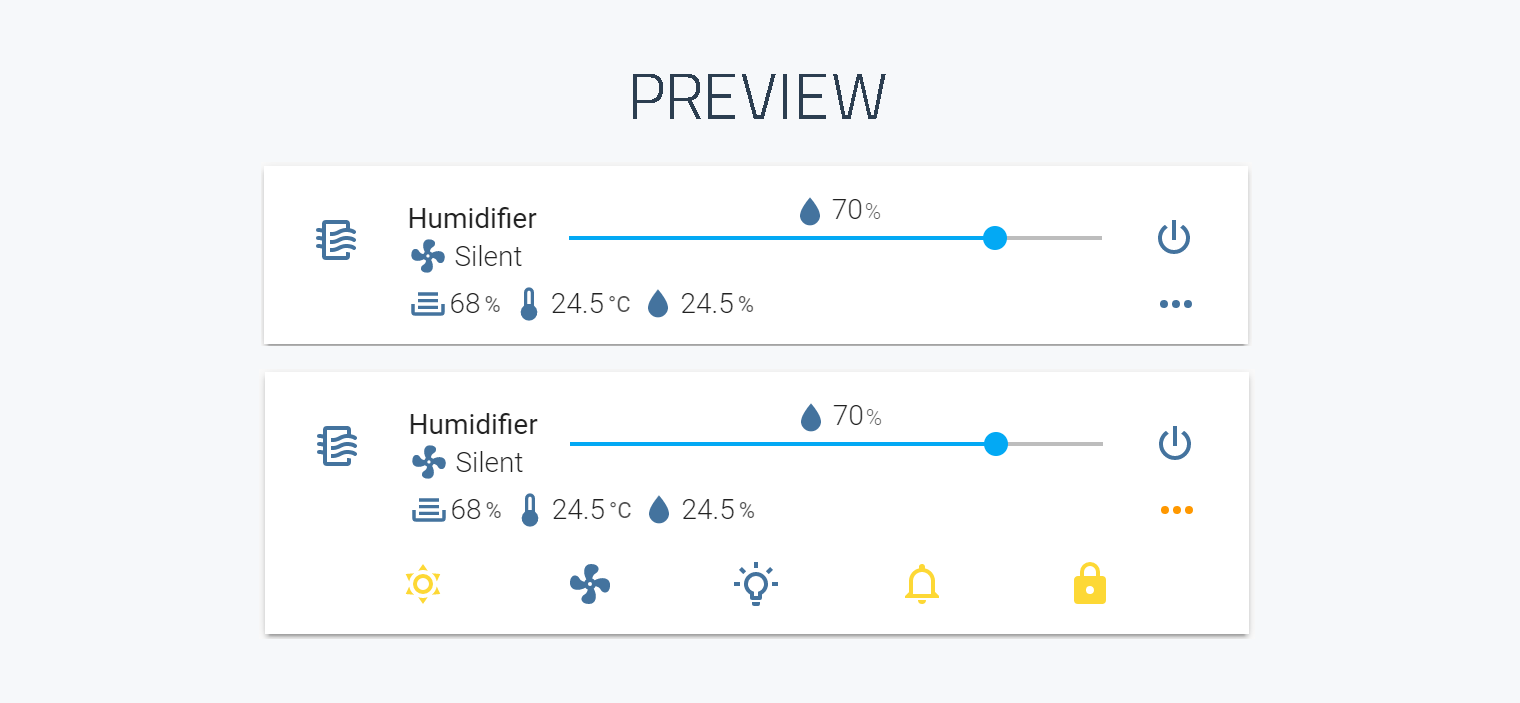
Please star this repository if you find it useful.
## Compatibility
| | |
|---|---|
| Home Assistant | 2022.11 or newer |
| Entity domain | `fan` or `humidifier` |
The card is developed against the current Home Assistant release and tested on
[zhimi.humidifier.cb1](https://www.home-assistant.io/integrations/xiaomi_miio).
It renders Home Assistant's own frontend elements, and those change between
releases: Home Assistant 2025.10 replaced the slider the card uses, which broke
the layout of the target-humidity row. Version 3.1.6 and newer detect which
slider they are running against and lay out correctly on either side of that
line, so there is one build for every supported version.
## Install
### HACS
The card is in the HACS default repositories.
1. Open **HACS** in Home Assistant.
2. Search for **mini humidifier** and download it.
3. HACS adds the dashboard resource for you. Reload the browser afterwards.
### Manual
1. Download `mini-humidifier-bundle.js` from the
[latest release](https://github.com/artem-sedykh/mini-humidifier/releases/latest)
and put it in your `config/www` directory.
2. Register it as a dashboard resource.
On a dashboard in storage mode (the default), go to
**Settings -> Dashboards -> three-dot menu -> Resources -> Add resource**,
URL `/local/mini-humidifier-bundle.js`, type **JavaScript Module**.
On a dashboard in YAML mode, add it to your Lovelace configuration instead:
```yaml
resources:
- url: /local/mini-humidifier-bundle.js?v=3.5.2
type: module
```
The `?v=` part is only there to defeat the browser cache. Bump it whenever
you replace the file.
3. Reload the browser.
### Checking what you downloaded
`mini-humidifier-bundle.js` is built and signed by
[the release workflow](https://github.com/artem-sedykh/mini-humidifier/blob/master/.github/workflows/cd.yml),
and every release body carries the file's sha256. With the
[GitHub CLI](https://cli.github.com/) you can check the copy on your disk
against the build that published it - through HACS or by hand, it is the same
file:
```console
gh attestation verify mini-humidifier-bundle.js -R artem-sedykh/mini-humidifier
```
It prints the workflow and the tag the file was built from. Without the CLI,
compare its sha256 with the one on the release page.
## Updating
Through HACS, updates arrive like any other HACS update.
Manually: replace `config/www/mini-humidifier-bundle.js` with the file from the
[latest release](https://github.com/artem-sedykh/mini-humidifier/releases/latest),
bump the `?v=` query string if you use one, and reload the browser. Clearing the
browser cache is often necessary, because the frontend caches resources hard.
Skipping several versions at once is the usual case, since people update when
they notice rather than when a release is tagged. Everything that changed in
between is in
[CHANGELOG.md](https://github.com/artem-sedykh/mini-humidifier/blob/master/CHANGELOG.md),
newest first, rather than spread across one release page per version.
## Quick start
```yaml
type: custom:mini-humidifier
entity: fan.xiaomi_miio_device
```
That is the whole minimum configuration. Everything else has a default, taken
from the [model](https://artem-sedykh.github.io/mini-humidifier/models/) the card is configured for.

A slightly fuller example:
```yaml
type: custom:mini-humidifier
entity: fan.xiaomi_miio_device
name: Bedroom
model: 'zhimi.humidifier.cb1'
secondary_info: last-changed
```
## Documentation
Everything below is also published as a searchable site:
**[artem-sedykh.github.io/mini-humidifier](https://artem-sedykh.github.io/mini-humidifier/)**.
It renders these same files, so there is nothing on it that is not here.
| | |
|---|---|
| [Getting started](https://artem-sedykh.github.io/mini-humidifier/getting-started/) | From the smallest card to one that is yours |
| [Configuration](https://artem-sedykh.github.io/mini-humidifier/configuration/) | Every card option, the action object, theme variables |
| [Models](https://artem-sedykh.github.io/mini-humidifier/models/) | Supported devices, and how to add one |
| [Custom device](https://artem-sedykh.github.io/mini-humidifier/custom-device/) | A device with no preset, end to end, and the contract the templates run under |
| [Controls](https://artem-sedykh.github.io/mini-humidifier/controls/) | Target humidity, power button, toggle button, secondary info, group |
| [Indicators](https://artem-sedykh.github.io/mini-humidifier/indicators/) | The read-only values under the entity name |
| [Buttons](https://artem-sedykh.github.io/mini-humidifier/buttons/) | The bottom panel: buttons and dropdowns |
| [Examples](https://artem-sedykh.github.io/mini-humidifier/examples/) | `tap_action` snippets |
| [AI assistants](https://artem-sedykh.github.io/mini-humidifier/ai-assistants/) | Writing a card with an assistant: the docs as `llms.txt`, and what to check in what comes back |
| [Development](https://artem-sedykh.github.io/mini-humidifier/development/) | Building the card locally |
Contributing: [CONTRIBUTING.md](https://github.com/artem-sedykh/mini-humidifier/blob/master/CONTRIBUTING.md). Agents working on this
repository should read [AGENTS.md](https://github.com/artem-sedykh/mini-humidifier/blob/master/AGENTS.md).
## Supported models
`model:` selects a set of defaults. Two of them are not devices at all, and they
are the answer for hardware this card has no preset for:
- `humidifier` - any `humidifier` entity: an MQTT humidifier, a dehumidifier on
a smart switch, anything Home Assistant exposes in that domain.
- `none` - no bundled defaults, for a card that writes out every control itself.
```yaml
type: custom:mini-humidifier
entity: humidifier.basement_dehumidifier
model: humidifier
```
The rest are devices: the model ids of your integration, which for the `xiaomi_miio`
ones have an `xiaomi_miio_airpurifier:` prefix when they come through syssi's
integration. A device that is not listed still works - start from
`model: humidifier`, or leave `model:` out to fall back to the
`zhimi.humidifier.cb1` defaults. Every control can still be overridden in YAML.
The full table of device presets, and how to add one, is in
[Models](https://artem-sedykh.github.io/mini-humidifier/models/).
## Troubleshooting
**An option seems to do nothing** - open the browser console. The card reports
what it is about to ignore: a key it does not read, an action it does not
handle, a singular `indicator:` where it wants `indicators:`. It only warns and
carries on rendering, so nothing on the card itself will tell you.
**"Custom element doesn't exist: mini-humidifier"** - the resource is not
loaded. Check that the URL in the dashboard resources actually resolves in the
browser, and that its type is `module`.
**The card looks wrong after an update** - the browser is serving the old
bundle. Hard-reload, clear the cache, and bump the `?v=` query string if you
installed manually.
**A HACS update changed nothing, every time** - check where your dashboard
resources live. When HACS manages them, which is the default, it rewrites the
resource URL on every update with a version-derived `?hacstag=`, and the new
file is picked up by itself. If you keep `resources:` in YAML
(`lovelace: resource_mode: yaml`), HACS leaves them alone entirely - it logs
`YAML mode detected, can not update resources` and stops - so the URL never
changes and the browser keeps serving what it cached a month ago. In that
setup, bumping `?v=` yourself after every HACS update is not optional.
**An option does nothing** - check the `model:` value. An unrecognised model is
not an error; the card silently falls back to the default one, and the defaults
it brings may not match your device.
Still stuck? Open an [issue](https://github.com/artem-sedykh/mini-humidifier/issues)
with your card YAML and the entity's attributes from **Developer tools ->
States**.
Contributing: [CONTRIBUTING.md](https://github.com/artem-sedykh/mini-humidifier/blob/master/CONTRIBUTING.md)
- it has how to add a device, and the list of the people who built this card.
Agents working on this repository should read
[AGENTS.md](https://github.com/artem-sedykh/mini-humidifier/blob/master/AGENTS.md).
## License
MIT. See [LICENSE](https://github.com/artem-sedykh/mini-humidifier/blob/master/LICENSE).
---
# Getting started
Source: https://artem-sedykh.github.io/mini-humidifier/getting-started/
The card is one YAML block. Everything else has a default, which is what makes
it hard to know where to start: here is a path, from a card that just works to
one that is yours.
## The smallest card
A humidifier entity and nothing else:
```yaml
type: custom:mini-humidifier
entity: humidifier.xiaomi_miio_zhimi_humidifier_cb1
```
That is the whole of it. The card reads the entity's name, its humidity, and
the controls the entity exposes - an on/off button, a target-humidity slider,
and anything else in the device's own `available_modes`.

## A device, not just a domain
`model:` chooses a set of device defaults. Leave it out and the card assumes a
Xiaomi `zhimi.humidifier.cb1`. Two names cover the cases that matter most:
| `model:` | For |
|----------|-----|
| `humidifier` | any `humidifier` entity - an MQTT humidifier, a dehumidifier on a smart switch, anything Home Assistant exposes in that domain |
| `none` | no bundled defaults at all - a card that writes out every control itself |
For a generic device, set `model: humidifier`:
```yaml
type: custom:mini-humidifier
entity: humidifier.xiaomi_miio_zhimi_humidifier_cb1
model: humidifier
```
The domain preset works from what Home Assistant guarantees for that domain
and nothing else: `turn_on`, `turn_off`, `set_humidity`, `set_mode`, and the
attributes `humidity` and `available_modes`. A device the card has no preset
for starts here. See [Models](https://artem-sedykh.github.io/mini-humidifier/models/) for the device presets, and
[GitHub's device list](https://github.com/artem-sedykh/mini-humidifier#supported-models)
for what is bundled.

## Making it yours
Name it, and point the read-only indicators at what you care about. Every
option has a default, but the ones below are where a card becomes a card:
```yaml
type: custom:mini-humidifier
entity: humidifier.xiaomi_miio_zhimi_humidifier_cb1
name: Bedroom
secondary_info:
icon: mdi:fan
indicators:
# The humidifier's own current humidity, an attribute of the entity.
humidity:
icon: mdi:water
unit: '%'
round: 0
source:
attribute: current_humidity
# A room sensor beside the humidifier.
room_temp:
icon: mdi:thermometer-low
unit: '°C'
round: 1
source:
entity: sensor.sensor_temp_hum_pre_bedroom_temperature
room_humidity:
icon: mdi:water-outline
unit: '%'
round: 1
source:
entity: sensor.sensor_temp_hum_pre_bedroom_humidity
```
`secondary_info` is the line under the name - here the mode, with a fan icon.
`indicators` are the read-only values below it, **merged over the model's
defaults** (the bundled indicators stay on the card). `source: attribute` reads
from the humidifier entity itself; `source: entity` reads from any entity in
the installation. See [Indicators](https://artem-sedykh.github.io/mini-humidifier/indicators/) for the full shape.

## The bottom panel
The controls - buttons and dropdowns - live in a panel hidden behind a
`...` icon. Open it always with `toggle.default`, and set the mode dropdown to
a language of your own:
```yaml
type: custom:mini-humidifier
entity: fan.xiaomi_miio_device
toggle:
default: on
buttons:
mode:
source:
auto: Auto
silent: Quiet
medium: Medium
high: High
```
The bundled models come with a set of buttons (dry, mode, LED, buzzer, child
lock for the Xiaomi ones). Add or change them under `buttons: :`, and a
button can act on a different entity than the humidifier itself. See
[Buttons](https://artem-sedykh.github.io/mini-humidifier/buttons/).
## The action object
A tap on the card does something by default (`more-info`). Point it anywhere
with `tap_action`, a full [action object](https://artem-sedykh.github.io/mini-humidifier/configuration/#action-object-options)
or the shorthand for a bare name:
```yaml
type: custom:mini-humidifier
entity: fan.xiaomi_miio_device
tap_action:
action: call-service
service: xiaomi_miio.fan_set_led_brightness
service_data:
brightness: 1
```
All the ready-made snippets are in [Examples](https://artem-sedykh.github.io/mini-humidifier/examples/).
## Where the rest is
- [Configuration](https://artem-sedykh.github.io/mini-humidifier/configuration/) - every card option, the action object,
the theme variables.
- [Models](https://artem-sedykh.github.io/mini-humidifier/models/) - each set of device defaults, and how to add one.
- [Custom device](https://artem-sedykh.github.io/mini-humidifier/custom-device/) - a device with no preset, end to end.
- [Controls](https://artem-sedykh.github.io/mini-humidifier/controls/) - target humidity, power button, toggle button,
secondary info, group.
- [Indicators](https://artem-sedykh.github.io/mini-humidifier/indicators/) - the read-only values under the entity name.
- [Buttons](https://artem-sedykh.github.io/mini-humidifier/buttons/) - the bottom panel: buttons and dropdowns.
- [Examples](https://artem-sedykh.github.io/mini-humidifier/examples/) - `tap_action` snippets and complete cards.
---
# Configuration
Source: https://artem-sedykh.github.io/mini-humidifier/configuration/
Every option the card accepts. Start from the [quick start](https://artem-sedykh.github.io/mini-humidifier/#quick-start)
and add only what you need - everything below has a default.
Options marked **object** open a block of their own, documented on the page the
last column points at.
## Card options
`entity`, `model`, `name`, `icon`, `scale` and `group` can be set in the visual
editor, from the card's edit dialog. Everything else on this page is YAML, and
the editor leaves it alone: options it does not show are carried through
untouched, so a card written by hand can be opened in the editor and saved
again without losing anything.
| Name | Type | Default | Description |
|------|------|---------|-------------|
| `type` | string | **required** | `custom:mini-humidifier` |
| `entity` | string | **required** | An entity_id from an entity within the `fan` or `humidifier` domain. |
| `name` | string | optional | Override the entity's friendly name. |
| `icon` | string | optional | Specify a custom icon from any of the available mdi icons. |
| `model` | string | `zhimi.humidifier.cb1` | Which set of device defaults to start from, see [Models](https://artem-sedykh.github.io/mini-humidifier/models/). |
| `group` | boolean | `false` | Removes paddings, background color and box-shadow, see [Group](https://artem-sedykh.github.io/mini-humidifier/controls/#group). |
| `scale` | number | `1` | UI scale modifier. |
| `tap_action` | [action object](#action-object-options) | `more-info` | Action on click/tap, see [Examples](https://artem-sedykh.github.io/mini-humidifier/examples/#action-object-examples). |
| `toggle` | object | optional | The button that shows and hides the bottom panel, see [Toggle button](https://artem-sedykh.github.io/mini-humidifier/controls/#toggle-button). |
| `secondary_info` | object | optional | The line under the entity name, see [Secondary info](https://artem-sedykh.github.io/mini-humidifier/controls/#secondary-info). |
| `power` | object | optional | The power button, see [Power button](https://artem-sedykh.github.io/mini-humidifier/controls/#power-button). |
| `target_humidity` | object | optional | The slider row, see [Target humidity](https://artem-sedykh.github.io/mini-humidifier/controls/#target-humidity). |
| `indicators` | object | optional | Read-only values under the entity name, see [Indicators](https://artem-sedykh.github.io/mini-humidifier/indicators/). |
| `buttons` | object | optional | Buttons and dropdowns in the bottom panel, see [Buttons](https://artem-sedykh.github.io/mini-humidifier/buttons/). |
Every option listed anywhere in this documentation exists in the v3 line. The
card requires Home Assistant 2022.11 or newer; see
[Compatibility](https://artem-sedykh.github.io/mini-humidifier/#compatibility).
## Action object options
| Name | Type | Default | Options | Description |
|------|:----:|:-------:|:-----------:|-------------|
| `action` | string | `more-info` | `more-info` / `navigate` / `call-service` / `url` / `none` | Action to perform. |
| `entity` | string | | Any entity id | Override default entity of `more-info`, when `action` is defined as `more-info`. |
| `service` | string | | Any service | Service to call (e.g. `fan.turn_on`) when `action` is defined as `call-service`. |
| `service_data` | object | | Any service data | Service data to include with the service call (e.g. `entity_id: fan.xiaomi_miio_device`). |
| `navigation_path` | string | | Any path | Path to navigate to (e.g. `/lovelace/0/`) when `action` is defined as `navigate`. |
| `url` | string | | Any URL | URL to open when `action` is defined as `url`. |
An action that needs nothing but its name can be written as a bare string:
`tap_action: none` and `tap_action: more-info` mean the same as
`tap_action: {action: none}` and `tap_action: {action: more-info}`. The same
shorthand works for an indicator's `tap_action`.
## Theme variables
Set these in your Home Assistant theme to change the appearance of the card.
Any CSS color notation works: a color name, hexadecimal, `rgb`, `rgba`, `hsl`,
`hsla`.
| Name | Default | Description |
|------|---------|-------------|
| `mini-humidifier-name-font-weight` | `400` | Font weight of the entity name |
| `mini-humidifier-info-font-weight` | `300` | Font weight of the states |
| `mini-humidifier-icon-color` | `var(--mini-humidifier-base-color, var(--paper-item-icon-color, #44739e))` | The color for icons |
| `mini-humidifier-button-color` | `var(--mini-humidifier-button-color, var(--paper-item-icon-color, #44739e))` | The color for button icons |
| `mini-humidifier-accent-color` | `var(--accent-color)` | The accent color of UI elements |
| `mini-humidifier-base-color` | `var(--primary-text-color)` and `var(--paper-item-icon-color)` | The color of base text |
| `mini-humidifier-background-opacity` | `1` | Opacity of the background |
| `mini-humidifier-scale` | `1` | Scale of the card |
---
# Models
Source: https://artem-sedykh.github.io/mini-humidifier/models/
The card ships defaults for a number of devices. `model:` picks which set of
defaults the card starts from; anything you set in YAML is merged over them.
## Available default configurations
Each entry is the value to put in `model:`. The source file for every one of
them lives in
[src/configurations](https://github.com/artem-sedykh/mini-humidifier/tree/master/src/configurations).
Devices exposed by Home Assistant's own
[xiaomi_miio](https://www.home-assistant.io/integrations/xiaomi_miio)
integration:
| `model:` | |
|---|---|
| `humidifier` | any `humidifier` entity, built on the domain rather than on a device - see below |
| `none` | no controls at all, for a card that describes its own - see below |
| `zhimi.humidifier.cb1` | the default, used when `model:` is left out |
| `zhimi.humidifier.ca1` | |
| `zhimi.humidifier.ca4` | |
| `zhimi.airpurifier.ma2` | |
| `zhimi.airfresh.va2` | |
| `deerma.humidifier.jsq` | |
| `deerma.humidifier.jsq1` | |
| `deerma.humidifier.mjjsq` | |
The same devices through syssi's third-party
[xiaomi_miio_airpurifier](https://github.com/syssi/xiaomi_airpurifier)
integration, which reports different attributes and calls different services:
| `model:` | |
|---|---|
| `xiaomi_miio_airpurifier:zhimi.humidifier.cb1` | |
| `xiaomi_miio_airpurifier:zhimi.humidifier.ca4` | by @ravikwow |
| `xiaomi_miio_airpurifier:zhimi.airpurifier.mb3` | by @regevbr |
| `xiaomi_miio_airpurifier:zhimi.airfresh.va2` | |
| `xiaomi_miio_airpurifier:deerma.humidifier.mjjsq` | |
| `xiaomi_miio_airpurifier:deerma.humidifier.jsq5` | by @akovovh |
## What each one draws
One picture per configuration, not per `model:` - three ids share the `cb1`
file and three more share deerma's, so six copies of one card would answer
nothing. Every card below is the same entity, a Xiaomi humidifier with the
sensors and switches its integration creates beside it, with the button panel
open.
### `humidifier`
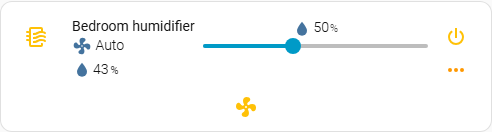
The `humidifier` domain and nothing beyond it: on/off, the target slider from
`min_humidity` and `max_humidity`, the reading from `current_humidity`, and the
modes the entity reports.
### `none`
Nothing at all - the name and the icon. Everything else is for the card to
describe itself, which is what this preset is for.

### `zhimi.humidifier.cb1`, `zhimi.humidifier.ca1`, `zhimi.humidifier.ca4`
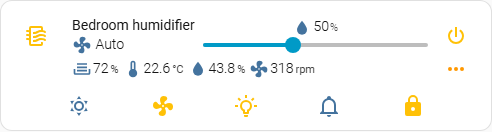
Water level, temperature, humidity and motor speed, read from the sensors the
integration creates beside the humidifier; dry mode, the fan modes, LED
brightness, buzzer and the child lock. This is the default, so it is also what a
card with no `model:` at all draws.
### `zhimi.airpurifier.ma2`
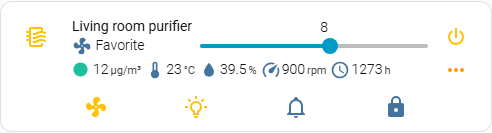
An air purifier: the slider sets the favourite level rather than a humidity, and
the first indicator is the air quality, coloured by how bad it is.
### `zhimi.airfresh.va2`
The slider is the fan speed as a percentage, and there is a carbon dioxide
reading and the filter's hours beside the air quality.
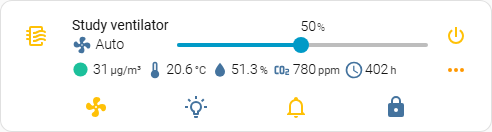
### `deerma.humidifier.jsq`, `deerma.humidifier.jsq1`, `deerma.humidifier.mjjsq`
A simpler device: the water tank is a binary sensor rather than a level, so the
first indicator reads `filled` or `empty`, and there is no motor speed and no
child lock.
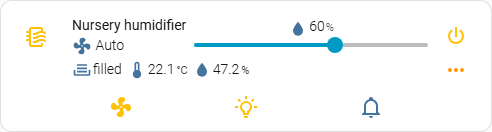
### The same devices through syssi's component
These read everything as attributes of one `fan` entity and call that
component's own services, where the integration in the first table creates a
sensor, a switch and a select beside the humidifier. That is why the same device
appears twice: the card has to ask a different question.
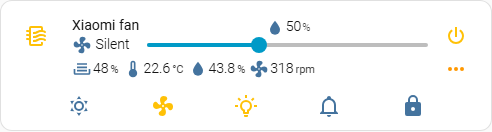
#### `xiaomi_miio_airpurifier:zhimi.humidifier.cb1`
Water depth, temperature, humidity and motor speed; dry mode, the fan modes, LED
brightness, buzzer and the child lock.
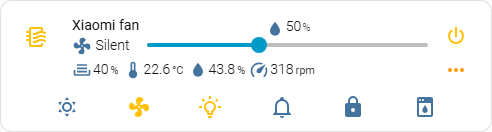
#### `xiaomi_miio_airpurifier:zhimi.humidifier.ca4`
The same, with the water level as a percentage rather than a depth, and a clean
mode button of its own.
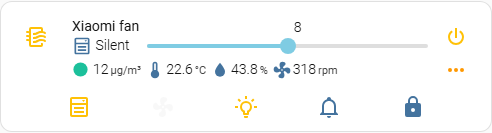
#### `xiaomi_miio_airpurifier:zhimi.airpurifier.mb3`
An air purifier: the slider sets the favourite level, and there is a fan level
beside the modes.
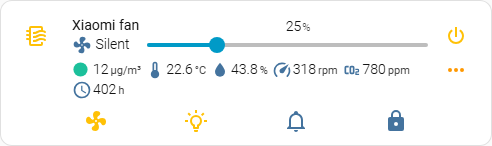
#### `xiaomi_miio_airpurifier:zhimi.airfresh.va2`
The slider is the fan speed, in the five steps the device has - the preset maps
each to a preset mode rather than to a percentage, which is why it moves in
quarters. Air quality, carbon dioxide and the filter's hours are read from the
fan's own attributes.
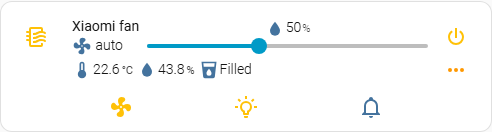
#### `xiaomi_miio_airpurifier:deerma.humidifier.mjjsq`, `xiaomi_miio_airpurifier:deerma.humidifier.jsq5`
A simpler device again: temperature, humidity, and a water tank that reads
`Filled` or `Empty` rather than a level. The two differ in one thing the picture
cannot show - the slider's range, 30-80 for the `mjjsq` and 40-70 for the
`jsq5`.
## A device that is not in the list
There are more humidifiers than this card ships configurations for, and that is
the normal case rather than a gap to apologise for. Three ways to configure one.
### `model: humidifier` - start from the domain
The preset for a plain Home Assistant humidifier: a
[generic_hygrostat](https://www.home-assistant.io/integrations/generic_hygrostat/),
an [MQTT humidifier](https://www.home-assistant.io/integrations/humidifier.mqtt/),
a dehumidifier on a smart switch, anything else that is a `humidifier` entity
and nothing more.
```yaml
type: custom:mini-humidifier
entity: humidifier.basement_dehumidifier
model: humidifier
```
That is the whole configuration. It is built on what Home Assistant guarantees
for the domain and on nothing else:
| What | Where it comes from |
|---|---|
| power | `humidifier.turn_on` / `humidifier.turn_off` |
| target humidity | the `humidity` attribute, set with `humidifier.set_humidity` |
| the slider's range | the `min_humidity` and `max_humidity` attributes |
| the reading under the name | the `current_humidity` attribute |
| modes | `available_modes`, set with `humidifier.set_mode`, disabled when the device reports none |
Anything the device has beyond the domain - a night light, a buzzer, an
external humidity sensor, a filter reading - is added in YAML on top, the same
way it would be on any other model. What this preset deliberately does not do is
guess: no LED, buzzer, child lock or water level, because those belong to
particular integrations rather than to the domain, and a preset that assumes
them calls services the device does not have.
Reach for it whenever the device is not in the table above and is a `humidifier`
entity. For a device exposed as `fan`, or one close to a bundled model, the two
options below still apply.
A card added from the dashboard picker for a `humidifier` entity starts here
already - the picker writes `model: humidifier` into the configuration it hands
you, so what it says is what the card is doing.
### `model: none` - start from nothing
The preset that brings no controls at all. Nothing is merged in, so the card
shows exactly what your YAML asks for and nothing else:
```yaml
type: custom:mini-humidifier
entity: humidifier.my_device
model: none
name: Humidifier
power:
hide: false # single controls start hidden - see below
type: button
state:
entity: switch.my_device
toggle_action: |
(state, entity) => {
const service = state === 'on' ? 'turn_off' : 'turn_on';
return this.call_service('switch', service, { entity_id: entity.entity_id });
}
indicators:
humidity:
icon: mdi:water-percent
unit: '%'
source:
entity: sensor.my_humidity
```
**`power` and `target_humidity` start hidden, and want `hide: false`.** Every
other section is a collection, so an empty one is simply empty; those two are
single controls, and an empty one would be a button that does nothing when
pressed. Writing the block is not enough on its own - say `hide: false` in it.
That is the one sharp edge of starting from nothing.
`secondary_info` shows the current mode by default, read off a `mode` button. A
card with none shows nothing there rather than failing.
### Naming a device the card does not ship for
Writing a `model:` the card does not know is also **supported**, and does
something different: it starts from the *default* configuration and your YAML is
merged over it. Useful when your device is close to a bundled one and you want
to adjust rather than start over. [Issue #112](https://github.com/artem-sedykh/mini-humidifier/issues/112)
is a complete example for a `deerma.humidifier.jsq2w`, which is not in the table
above.
What that gets you is a name for your device that stays in the configuration and
reads correctly to the next person to open it. What it does not get you is any
of that device's defaults, so plan on writing out the controls you want -
`target_humidity`, `power`, `indicators`, `buttons` - rather than expecting them
to arrive.
Since 3.4.0 the card says so in the browser console when it does this:
```
mini-humidifier: 'deerma.humidifier.jsq2w' is not one of the bundled model
configurations, so the card started from the default one. That is supported ...
```
The message is there for the other half of the same behaviour: a typo. Up to
3.3.0 `zhimi.humidifier.cb11` and `zhimi.humidifier.cb1` behaved identically and
nothing said which one the card had used, and `deerma.humidifier.mjjsq` against
`xiaomi_miio_airpurifier:deerma.humidifier.mjjsq` - one device through two
integrations that call different services - is the same trap with real
consequences. The card still renders either way; the console is where you find
out which set it started from.
Leaving `model:` out asks for the default set, as it always has. `model: default`
says the same thing explicitly and warns about nothing, and so does
`model: none` - it is a preset of the card's own, not an unrecognised id.
Which of the two to reach for: `none` when you are describing the device
yourself and the bundled controls are in the way, an unrecognised name when the
default set is most of what you want.
## Adding a model
1. Copy the closest existing file in `src/configurations//` and
adjust it. [zhimi_humidifier_cb1.js](https://github.com/artem-sedykh/mini-humidifier/blob/master/src/configurations/xiaomi_miio/zhimi_humidifier_cb1.js)
is the reference.
2. Register it in
[src/humidifiers.ts](https://github.com/artem-sedykh/mini-humidifier/blob/master/src/humidifiers.ts).
3. Make sure `change_action` and `toggle_action` call services that exist in
the integration you filed the model under. A configuration copied from
another integration renders correctly and does nothing when clicked.
4. Add the model to the tables above.
5. Open a pull request. If you cannot write the file, open an issue with the
entity's attributes from **Developer tools -> States** instead.
> Using the default configuration for a specific model
```yaml
type: custom:mini-humidifier
entity: fan.xiaomi_miio_device
# zhimi.humidifier.cb1 default value may be omitted, added for example.
model: 'zhimi.humidifier.cb1'
```
[deerma.humidifier.mjjsq](https://github.com/artem-sedykh/mini-humidifier/blob/master/src/configurations/xiaomi_miio_airpurifier/deerma_humidifier_mjjsq.js)
```yaml
type: custom:mini-humidifier
entity: fan.xiaomi_miio_device
model: 'xiaomi_miio_airpurifier:deerma.humidifier.mjjsq'
```
> localize status indicator
```yaml
type: custom:mini-humidifier
entity: fan.xiaomi_miio_device
model: 'deerma.humidifier.mjjsq'
indicators:
status:
empty: пустой
filled: полный
```
---
# A device with no preset
Source: https://artem-sedykh.github.io/mini-humidifier/custom-device/
The card ships defaults for fourteen devices. The market has hundreds, so
configuring one the card has never heard of is the normal path rather than a
workaround, and this page walks it end to end: what to read off the device
first, which base to start from, and how to write the parts the base does not
cover.
It is also the page to hand an AI assistant that is helping with a card. The
assistant does not need to know your humidifier - it needs the language the
card speaks, and that language is [the contract](#the-contract) at the bottom.
The worked example is real: a Levoit Classic 300S through the
[VeSync](https://www.home-assistant.io/integrations/vesync/) integration, from
[issue #124](https://github.com/artem-sedykh/mini-humidifier/issues/124),
including the mistake it was opened for.
## 1. Read the entity before writing any YAML
Everything the card can show comes out of the entity, so open **Developer tools
-> States**, find the entity, and read what is actually there rather than what
the integration's page says it should be. A `humidifier` entity looks roughly
like this, and the names are what matter - your values will differ:
```yaml
humidifier.classic300s:
state: 'on'
attributes:
min_humidity: 30
max_humidity: 80
humidity: 60 # the target, what the slider sets
current_humidity: 52 # the reading, what the indicator shows
mode: auto
available_modes: [auto, sleep, manual]
```
Two things are worth writing down before moving on: **which attribute holds the
target** and **which holds the reading**. They are `humidity` and
`current_humidity` for the domain, but a device exposed as `fan` by an
integration of its own puts them wherever it likes, and every mismatch further
down starts here.
Then open **Settings -> Devices & services**, find the device, and look at the
list of entities beside it. An integration rarely creates one: this one adds a
night light and a reading of its own.
| Entity | What it is |
|---|---|
| `humidifier.classic300s` | the humidifier: on/off, target, modes |
| `sensor.classic300s_current_humidity` | the room reading, as a sensor |
| `light.classic300s_night_light` | the night light, dimmable |
Those three lines are the whole input. Everything below is decided by them.
## 2. Pick the base
`model:` says which set of defaults your YAML is merged over. There are four
answers and they are not interchangeable:
| Your device | `model:` | What you get |
|---|---|---|
| a `humidifier` entity | `humidifier` | power, target humidity, the reading, modes - built on the domain |
| close to a bundled device | that device's id | its controls, to adjust rather than write |
| you are describing everything yourself | `none` | nothing at all |
| you want your device named in the config | your own string | the **default** Xiaomi set, and a console warning |
The Classic 300S is a `humidifier` entity, so `model: humidifier` - and that
already covers power, the target slider, the modes dropdown from
`available_modes`, and a humidity reading from `current_humidity`.
**The slider range is the reason this choice matters more than it looks.**
`min`, `max` and `step` are read from the configuration first and from the
entity's `min_humidity` / `max_humidity` only when the configuration is silent.
The default Xiaomi preset is not silent - it says 30, 80 and 10 - so a card that
falls back to it gets that range whatever the device reports. `humidifier` and
`none` say nothing on purpose, so the device's own range wins.
Leaving `model:` out is the same as naming a device the card does not ship for:
both land on the default Xiaomi preset, whose buttons call `xiaomi_miio`
services. That is supported and sometimes what you want - see
[Models](https://artem-sedykh.github.io/mini-humidifier/models/#naming-a-device-the-card-does-not-ship-for) - but it is
rarely the right base for a device from another integration.
## 3. Add what the base does not cover
A preset covers what its foundation guarantees. Everything else - a night
light, a buzzer, a filter reading, a humidity sensor that lives outside the
humidifier - is written on top, and there are only two shapes to write.
**A reading is an indicator.** `source: entity` points it at any entity in the
installation; leave it out and it reads the card's own.
```yaml
indicators:
humidity:
icon: mdi:water
unit: '%'
round: 0
source:
entity: sensor.classic300s_current_humidity
```
**Anything you press is a button**, and `state: entity` is what points it
somewhere other than the humidifier. That entity is also the one the button's
templates are handed as their `entity` argument, which is what makes
`toggle_action` short:
```yaml
buttons:
night_light:
icon: mdi:lightbulb-night
type: dropdown
order: 2
state:
entity: light.classic300s_night_light
attribute: brightness
source:
'0': 'Off'
'128': 'Dim'
'255': 'Bright'
active: (state) => Number(state) > 0
change_action: |
(selected, state, entity) => {
const options = { entity_id: entity.entity_id, brightness: Number(selected) };
return this.call_service('light', 'turn_on', options);
}
```
A plain `switch` needs less than that: a button with no `toggle_action` calls
`switch.toggle` on its own entity, so `state: entity` alone is a working
switch button.
### The mistake this example was opened for
Issue #124 wrote `entity_id: light.classic300s_night_light` at the top of the
button, and the dropdown drove the humidifier instead of the light. Nothing
warned, and here is why: **a key the card does not read inside a button or an
indicator is left alone on purpose**. It becomes part of the template scope -
readable from the templates as `this.entity_id` - which is how the bundled
presets carry their own values. So the button looked configured, and was not.
The option that points a control at another entity is `state: entity` for a
button and `source: entity` for an indicator. There is no third spelling.
## 4. The finished card
```yaml
type: custom:mini-humidifier
entity: humidifier.classic300s
model: humidifier
name: Bedroom
indicators:
humidity:
icon: mdi:water
unit: '%'
round: 0
source:
entity: sensor.classic300s_current_humidity
buttons:
night_light:
icon: mdi:lightbulb-night
type: dropdown
order: 2
state:
entity: light.classic300s_night_light
attribute: brightness
source:
'0': 'Off'
'128': 'Dim'
'255': 'Bright'
active: (state) => Number(state) > 0
change_action: |
(selected, state, entity) => {
const options = { entity_id: entity.entity_id, brightness: Number(selected) };
return this.call_service('light', 'turn_on', options);
}
```
Power, the slider with the device's own 30-80 range, and the modes dropdown are
not in there because `model: humidifier` brings them.
Check the `brightness` values your own integration reports rather than copying
these: VeSync reports a plain 0-255 for some models and a small step count for
others, and a dropdown whose ids do not match what the entity holds shows no
selection.
## 5. Read the console once
Open the browser console after the card renders. This is where the card says
what it could not do, because a message thrown from a card configuration never
reaches the screen - Home Assistant draws a red rectangle and drops the text.
The card therefore warns and renders instead of failing, and the console is the
only place any of it appears:
| What you see | What it means |
|---|---|
| `... is not one of the bundled model configurations` | the `model:` you wrote is not in the registry, so the card started from the default Xiaomi set |
| `'x' is not an option this card reads` | a top-level key the card ignores, sometimes with the option you meant |
| `... reads sensor.x, which does not exist` | an entity id that resolves to nothing - the control is left out |
| `... threw TypeError ...` | one of your templates failed, and the card rendered as if that option had not been written |
| `... is 'x', which the card does not handle` | a `tap_action` name that is not one of the five |
An empty console and a card that still looks wrong means the configuration
arrived intact and the values are not what you expected - go back to
**Developer tools -> States**.
## The contract
The rest of the documentation lists options page by page. This is the part that
does not fit in a table: what those options are made of.
### Where a value comes from
Indicators read through `source`, buttons and the two single controls read
through `state`. Both are the same three keys:
| Key | Default | What it does |
|---|---|---|
| `entity` | the card's entity | which entity to read |
| `attribute` | the entity's `state` | which attribute to read |
| `mapper` | | a template that turns the raw value into what is shown |
`{entity_id}` in an `entity` is replaced with the object id of the card's own
entity: on a card for `humidifier.bedroom`, `switch.{entity_id}_heater` resolves
to `switch.bedroom_heater`. That is how the bundled presets reach the entities
their integrations create, and it is available to your YAML for the same reason.
Home Assistant appends `_2` to the second device of a kind, which is enough to
break the match - the card names any entity it cannot find in the console rather
than leaving the control silently missing.
### Where a dropdown's items come from
A `dropdown` button offers what its own `source` block holds, and there are two
ways to fill it:
- **Written out**, as `value: label` pairs. Use it when the values are fixed:
the three brightness levels of a night light are not going to change.
- **Built from the entity**, with `source: __init` - a template handed the
button's entity, answering a list of `{ id, name }`. Use it when the device
decides: `available_modes` is a different list on every humidifier, and the
domain preset's modes dropdown is exactly this.
```yaml
buttons:
mode:
type: dropdown
state:
attribute: mode
source:
__init: |
(entity) =>
(entity.attributes.available_modes || []).map(mode => ({ id: mode, name: mode }))
change_action: |
(selected, state, entity) => {
const options = { entity_id: entity.entity_id, mode: selected };
return this.call_service('humidifier', 'set_mode', options);
}
```
`|| []` rather than `entity.attributes.available_modes.map(...)`, because a
device that reports no modes at all is normal - a generic_hygrostat has none.
`source: __filter` is the other half of the same idea: it post-processes the
list, whichever way it was built, which is how the bundled presets translate
their labels.
An item's `id` is matched against the button's state to decide which one is
selected, so ids that do not appear in the state show as no selection at all.
### What a template is
Every option documented as a function is a template, and a template is **source
text**, not a closure. The card takes the text of what you wrote, re-parses it
with `new Function`, and calls the result with a `this` of its own. Three
consequences, all of them things people try:
- **Nothing from outside is in scope.** No imports, no variables from elsewhere
in the dashboard, no `hass`. What the template gets is its arguments and
`this`.
- **`this` is the block the template is written in**, so every key you write
beside it is readable: `max_value: 125` next to a mapper is `this.max_value`
inside it. This is the extension point that makes the presets short, and the
reason unknown keys inside a control are never reported as typos.
- **A template that throws when it runs does not break the card.** It is
wrapped: the console gets the option's path and the error, once, and the card
renders as if that option had not been written. A template that does not
*parse* is the exception - see [what the card refuses](#what-the-card-refuses). Before the wrapper, a throw inside a render left
that control in the tree with an empty shadow root - a slider that vanished
with no message anywhere ([#70](https://github.com/artem-sedykh/mini-humidifier/issues/70)).
`this` also carries the methods the templates need:
| Method | What it does |
|---|---|
| `this.call_service(domain, service, options)` | calls a Home Assistant service, returns a promise |
| `this.toggle_state(state)` | `'on'` to `'off'` and back, leaving unavailable states alone |
| `this.localize(key, fallback)` | this card's own translations, for a preset that ships them |
| `this.entity_config` | the card's whole raw configuration, for a template that has to look at it |
`call_service` is on buttons, the power button and the target humidity slider -
the controls that act. An indicator gets the other three: it is read-only by
construction.
### Which options are not templates
Worth knowing before writing one that never runs:
- **`hide`** is a boolean. A control that should come and go with the device is
written as `disabled` instead, which is a template - that is why the domain
preset disables its modes dropdown rather than hiding it.
- **`min`, `max` and `step`** are numbers, read from the configuration and
otherwise from the entity's `min_humidity` / `max_humidity`.
- **`order`** is a number. Written as a string, the sort is a string sort and
`'10'` comes before `'9'`; the card warns about this one.
- **`type`, `icon` as a plain string, `unit` as a plain string** are values. Both
`icon` and `unit` also take an object with a `template` inside, which is the
templated form.
### Where `model` is allowed to be unknown
Anywhere. `model:` naming something the registry does not have starts the card
from the default configuration and warns in the console - it is not an error,
and it will not become one.
[Issue #112](https://github.com/artem-sedykh/mini-humidifier/issues/112) is a
complete configuration for a `deerma.humidifier.jsq2w` written by a user and
copied since; refusing unknown ids would break it and every card copied from it.
Naming your device is how a configuration stays readable to whoever opens it
next, and how a preset eventually gets contributed back.
### What the card refuses
Two things, and only two. Both stop the card from rendering at all, which on a
dashboard means a red rectangle with no text in it - the message is in the
console:
- **an `entity` outside the `fan` and `humidifier` domains.** A card with
nothing to read has nothing to render either.
- **a template that does not parse.** The compile step is where the text you
wrote becomes a function, and a missing brace has no value to fall back to.
This is the one case where a mistake inside a template is fatal rather than
reported: a template that parses and then throws when it runs is caught, named
in the console, and skipped.
Everything else warns and renders.
## When it works, send it back
A configuration that drives a device the card has no preset for is a preset
waiting to happen, and three of the fourteen bundled models arrived exactly that
way. [Adding a model](https://artem-sedykh.github.io/mini-humidifier/models/#adding-a-model) is the short version: one file
in `src/configurations/`, one line in the registry. If you would rather not write
the file, open an issue with the YAML that works and the entity's attributes -
that is the hard half, and it is already done by the time a card works.
---
# Controls
Source: https://artem-sedykh.github.io/mini-humidifier/controls/
The parts of the card a user interacts with, plus the line of text under the
entity name.
## Target humidity
Options under `target_humidity:`.
| Name | Type | Default | Description |
|------|------|---------|-------------|
| `icon` | string or object | `mdi:water` | A custom mdi icon, or an icon config object. |
| `icon: template` | function | | Icon retrieval function. |
| `icon: style` | function | | Function returning icon styles. |
| `hide` | boolean | `false` | Hide the target humidity control. |
| `hide_indicator` | boolean | `false` | Hide the value shown next to the slider. |
| `disabled` | boolean or function | from the model | Disable the slider. Falls back to the value in the configured [model](https://artem-sedykh.github.io/mini-humidifier/models/), and then to the [default model](https://github.com/artem-sedykh/mini-humidifier/blob/master/src/configurations/xiaomi_miio/zhimi_humidifier_cb1.js#L28). |
| `unit` | string or object | `%` | Display unit, or a unit config object. |
| `unit: template` | function | | Function returning the unit, for a value whose unit depends on it. |
| `min` | number | from the model, then the entity | Minimum target humidity. When neither the configuration nor the model gives a number, the entity's `min_humidity` is used, and 0 when it reports none. |
| `max` | number | from the model, then the entity | Maximum target humidity. Falls back to the entity's `max_humidity` the same way, and to 100. |
| `step` | number | from the model | Slider step, 1 when nothing gives one. Not read from the entity. |
| `action_timeout` | number | `3500` | Milliseconds to wait before the card re-reads the entity state after a change. |
| `state` | object | | Where to read the current value from. |
| `state: entity` | string | current entity | Entity to read the value from. |
| `state: attribute` | string | from the model | Attribute to read the value from - `humidity` in most presets, `target_humidity` in some. |
| `change_action` | function | | Called when the user moves the slider. |
> Functions available for the target_humidity:
| Name | Type | execution context | arguments | return type |
|------|------|-------------------|-----------|-------------|
|`state:mapper` | function | target_humidity config | current_value, entity, humidifier_entity | any
|`change_action` | function | target_humidity config | value, current_value, entity, humidifier_entity | promise
|`icon:template` | function | target_humidity config | current_value, entity, humidifier_entity | string
|`icon:style` | function | target_humidity config | current_value, entity, humidifier_entity | object
|`unit:template` | function | target_humidity config | current_value, entity, humidifier_entity | string
`current_value` - selected value
`value` - target_humidity value
`entity` - target_humidity entity
`humidifier_entity` - humidifier entity
**execution context methods:**
| Name | arguments | description | return type |
|------|-----------|-------------|-------------|
|`toggle_state` | sate | toggle state, example: `this.toggle_state('on') => off` | string
|`call_service` | domain, service, options, | call Home Assistant service | promise
> Configuration example for the target_humidity:
```yaml
type: custom:mini-humidifier
entity: fan.xiaomi_miio_device
target_humidity:
state:
attribute: target_humidity
mapper: (current_value, entity, humidifier_entity) => current_value
icon:
template: (current_value, entity, humidifier_entity) => 'mdi:tray-full'
style: "(current_value, entity, humidifier_entity) => ({ color: 'red' })"
unit: '%'
hide: off
min: 30
max: 80
step: 10
change_action: >
(value, current_value, entity, humidifier_entity) => {
const options = { entity_id: entity.entity_id, humidity: value };
return this.call_service('xiaomi_miio', 'fan_set_target_humidity', options);
}
```
> The default configuration is configured for `zhimi.humidifier.cb1`,
> to set target humidity, use the service `xiaomi_miio.fan_set_target_humidity`
> Example:
```yaml
type: custom:mini-humidifier
entity: fan.xiaomi_miio_device
target_humidity:
icon: 'mdi:water'
state:
attribute: target_humidity
unit: '%'
min: 30
max: 80
step: 10
change_action: >
(selected, state, entity) => {
const options = { entity_id: entity.entity_id, humidity: selected };
return this.call_service('xiaomi_miio', 'fan_set_target_humidity', options);
}
```
## Power button
Options under `power:`.
| Name | Type | Default | Description |
|------|------|---------|-------------|
| `type` | string | `button` | `toggle` or `button`. |
| `icon` | string | `mdi:power` | Specify a custom icon from any of the available mdi icons. |
| `hide` | boolean | `false` | Hide the power button. |
| `action_timeout` | number | `3500` | Milliseconds to wait before the card re-reads the entity state after a change. |
| `disabled` | function | | Button disabled calculation function. |
| `style` | function | | Function returning custom styles. |
| `state` | object | | Where to read the button state from. |
| `state: entity` | string | current entity | Entity to read the state from. |
| `state: attribute` | string | | Attribute to read the state from. |
| `state: mapper` | function | | State value processing function. |
| `toggle_action` | function | | Called when the button is clicked. |
> Functions available for the power:
| Name | Type | execution context | arguments | return type |
|------|------|-------------------|-----------|-------------|
|`state:mapper` | function | power config | state, entity, humidifier_entity | string
|`disabled` | function | power config | state, entity, humidifier_entity | boolean
|`style` | function | power config | state, entity, humidifier_entity | object
|`toggle_action` | function | power config | state, entity, humidifier_entity | promise
`state` - current power state
`entity` - current power entity
`humidifier_entity` - humidifier entity
**execution context methods:**
| Name | arguments | description | return type |
|------|-----------|-------------|-------------|
|`toggle_state` | sate | toggle state, example: `this.toggle_state('on') => off` | string
|`call_service` | domain, service, options, | call Home Assistant service | promise
> The power button can be of two types: `button` or `toggle`, default type: `button`
> Attention, the following configuration attributes (icon, disabled, state:attribute, style, toggle_action) are not available for the toggle type,
> since a standard ha-entity-toggle is used, the state of which I do not control
> Configuration example for the power button type `toggle`:
```yaml
type: custom:mini-humidifier
entity: fan.xiaomi_miio_device
power:
hide: off
state:
mapper: (state, entity, humidifier_entity) => state
```
> Configuration example for the power button type `button`:
```yaml
type: custom:mini-humidifier
entity: fan.xiaomi_miio_device
power:
icon: 'mdi:power'
type: button
state:
mapper: (state, entity, humidifier_entity) => state
hide: off
disabled: (state, entity, humidifier_entity) => false
style: "(state, entity, humidifier_entity) => ({ color: 'red' })"
toggle_action: >
(state, entity) => {
const service = state === 'on' ? 'turn_off' : 'turn_on';
return this.call_service('fan', service, { entity_id: entity.entity_id });
}
```
> The default configuration is configured for `zhimi.humidifier.cb1`,
> to on / off, use the service `fan.turn_on`, `fan.turn_off`
> Example:
```yaml
type: custom:mini-humidifier
entity: fan.xiaomi_miio_device
power:
icon: 'mdi:power'
type: button
hide: off
toggle_action: >
(current_state, entity) => {
const service = current_state === 'on' ? 'turn_off' : 'turn_on';
return this.call_service('fan', service, { entity_id: entity.entity_id });
}
```
## Toggle button
Options under `toggle:`.
| Name | Type | Default | Description |
|------|------|---------|-------------|
| `icon` | string | `mdi:dots-horizontal` | Custom icon. |
| `hide` | boolean | `false` | Hide the button. |
| `default` | boolean | `off` | Whether the bottom panel starts open. |
> toggle button configuration
> For example, we want to always show control buttons, and toggle button hide:
```yaml
type: custom:mini-humidifier
entity: fan.xiaomi_miio_device
toggle:
default: on
hide: on
```
## Secondary info
Options under `secondary_info:`. A bare string is accepted as a shorthand for
`type:`.
| Name | Type | Default | Description |
|------|------|---------|-------------|
| `type` | string | `mode` | `last-changed` or `mode`. |
| `icon` | string | | Icon, for type `mode`. |
| `hide` | boolean | `false` | Hide the secondary info line. |
```yaml
type: custom:mini-humidifier
entity: fan.xiaomi_miio_device
secondary_info: last-changed
type: custom:mini-humidifier
entity: fan.xiaomi_miio_device
secondary_info: #default type mode, changing icon
icon: 'mdi:fan'
```
## Group
> To display entities inside the container, set the group configuration parameter to `on`
```yaml
type: entities
title: Climate
show_header_toggle: true
state_color: true
entities:
- entity: fan.xiaomi_miio_device
type: custom:mini-humidifier
group: on
```
---
# Indicators
Source: https://artem-sedykh.github.io/mini-humidifier/indicators/
Indicators are the read-only values shown under the entity name: temperature,
humidity, water tank level, and anything else you point them at.
Options under `indicators: :`, where `` is yours to choose.
| Name | Type | Default | Description |
|------|------|---------|-------------|
| `icon` | string or object | | A custom mdi icon, or an icon config object. |
| `icon: template` | function | | Icon template function. |
| `icon: style` | function | | Function returning icon styles. |
| `value: style` | function | | Function returning styles for the reading and its unit. |
| `unit` | string or object | | Display unit, or a unit config object. |
| `unit: template` | function | | Function returning the unit, for a reading whose unit depends on its value. |
| `round` | number | | Number of decimals to round the value to. |
| `hide` | boolean | `false` | Hide the indicator. |
| `order` | number | its position | Sort order among the indicators, lowest first. |
| `tap_action` | [action object](https://artem-sedykh.github.io/mini-humidifier/configuration/#action-object-options) | optional | Action on click/tap. |
| `source` | object | | Where to read the value from. |
| `source: entity` | string | current entity | Entity to read the value from. |
| `source: attribute` | string | | Attribute to read the value from. |
| `source: mapper` | function | | Value processing function. |
The defaults for `zhimi.humidifier.cb1` set up three of them - depth,
temperature and humidity - see [Default indicators](#default-indicators).
Adding a simple indicator:
```yaml
type: custom:mini-humidifier
entity: fan.xiaomi_miio_device
indicators:
test:
icon: mdi:water
unit: '%'
round: 1
source:
entity: sensor.humidity
```
## Indicator functions
> Consider configuring an indicator using javascript
> Functions available for the indicator:
| Name | Type | execution context | arguments | return type |
|------|------|-------------------|-----------|-------------|
|`source:mapper` | function | indicator config | value, entity, humidifier_entity | any
|`icon:template` | function | indicator config | value, entity, humidifier_entity | string
|`icon:style` | function | indicator config | value, entity, humidifier_entity | object
|`unit:template` | function | indicator config | value, entity, humidifier_entity | string
`value` - current indicator value
`entity` - indicator entity
`humidifier_entity` - humidifier entity
## Source mapper
> Using the mapper function, you can change the indicator value:
> For zhimi.humidifier.cb1, a maximum depth value of 125 is used, which is 4 liters of tank,
> let's get how much water is left in liters or in percent
```yaml
type: custom:mini-humidifier
entity: fan.xiaomi_miio_device
indicators:
depth:
icon: 'mdi:tray-full'
unit: '%'
round: 0
# variable used in mapper
max_value: 125
# variable used in mapper
volume: 4
# variable used in mapper
type: 'percent'
source:
attribute: depth
mapper: >
(val) => {
const value = (100 * (val || 0)) / this.max_value;
return this.type === 'liters' ? (value * this.volume) / 100 : value;
}
```
## Icon template, style
> The indicator icon can be calculated dynamically
for example:
```yaml
type: custom:mini-humidifier
entity: fan.xiaomi_miio_device
indicators:
depth:
icon:
template: >
(value) => {
if (value === 0)
return 'mdi:tray';
if (value <= 20)
return 'mdi:tray-minus';
return 'mdi:tray-full';
}
style: >
(value) => {
if (value === 0)
return { color: 'red' };
if (value <= 20)
return { color: '#FD451D' };
return {};
}
unit: '%'
round: 0
# variable used in mapper
max_value: 125
# variable used in mapper
volume: 4
# variable used in mapper
type: 'liters'
source:
attribute: depth
mapper: >
(val) => {
const value = (100 * (val || 0)) / this.max_value;
return this.type === 'liters' ? (value * this.volume) / 100 : value;
}
```
## Default indicators
> The plugin is configured by default for zhimi.humidifier.cb1 and 3 default indicators are available in it temperature, humidity, depth
> Their configuration looks like this:
```yaml
type: custom:mini-humidifier
entity: fan.xiaomi_miio_device
indicators:
depth:
icon: 'mdi:tray-full'
unit: '%'
round: 0
order: 0
max_value: 125
volume: 4
type: 'percent'
source:
attribute: depth
mapper: >
(val) => {
const value = (100 * (val || 0)) / this.max_value;
return this.type === 'liters' ? (value * this.volume) / 100 : value;
}
temperature:
icon: 'mdi:thermometer-low'
unit: '°C'
round: 1
order: 1
source:
attribute: temperature
humidity:
icon: 'mdi:water'
unit: '%'
round: 1
order: 2
source:
attribute: humidity
```
> You can override the default indicators or even hide them and add your own
> We will display the depth value in liters and change the humidity icon as well as hide the temperature:
```yaml
type: custom:mini-humidifier
entity: fan.xiaomi_miio_device
indicators:
depth:
unit: 'L'
type: 'liters'
humidity:
icon: 'mdi:water-outline'
temperature:
hide: on
```
## Colouring the reading
`icon: style` colours the icon; `value: style` colours the number and the unit
after it. They are separate on purpose - an icon style is often geometry as well
as colour - and both are handed the same three arguments: the reading, the
entity it came from, and the humidifier.
The bundled `zhimi.airpurifier.ma2` colours an AQI dot from a table of levels.
Any key you write beside a template is readable from it as `this.`, so the same
table can colour the number as well:
```yaml
type: custom:mini-humidifier
entity: fan.xiaomi_miio_device
indicators:
aqi:
levels:
- { max: 50, color: '#1CC09B' }
- { max: 100, color: '#FFDE33' }
- { max: 150, color: '#F88B48' }
- { max: 100000, color: '#E64650' }
unit: 'µg/m³'
round: 0
source:
entity: sensor.{entity_id}_pm2_5
value:
style: |
(value) => {
const level = this.levels.find(l => Number(value) <= l.max);
return level ? { color: level.color } : {};
}
```
A style function that returns nothing leaves the reading as it was, and one
that throws is reported in the browser console by name, with the card rendering
as if it had not been written.
---
# Buttons
Source: https://artem-sedykh.github.io/mini-humidifier/buttons/
Buttons live in the bottom panel of the card. Two types are supported:
`button` and `dropdown`.
Options under `buttons: :`, where `` is yours to choose.
| Name | Type | Default | Description |
|------|------|---------|-------------|
| `icon` | string | | Specify a custom icon from any of the available mdi icons. |
| `type` | string | `button` | `button` or `dropdown`. |
| `order` | number | its position | Sort order among the buttons, lowest first. |
| `hide` | boolean | `false` | Hide the button. |
| `action_timeout` | number | `3500` | Milliseconds to wait before the card re-reads the entity state after a change. |
| `state` | object | | Where to read the button state from. |
| `state: entity` | string | current entity | Entity to read the state from, and the one the button acts on - see [A button for another entity](#a-button-for-another-entity). |
| `state: attribute` | string | | Attribute to read the state from. |
| `state: mapper` | function | | State processing function. |
| `disabled` | function | | Button disabled calculation function. |
| `style` | function | | Function returning custom styles. |
| `active` | function | | For type `dropdown`: whether the dropdown counts as active. |
| `source` | object | | For type `dropdown`: the items to offer. |
| `source: item` | string | | A dropdown item, in the form `value: label`. |
| `source: __init` | function | | Builds the items from the entity, instead of listing them. |
| `source: __filter` | function | | Post-processes the listed items: rename, reorder, drop. |
| `change_action` | function | | For type `dropdown`: called when an item is selected. |
| `toggle_action` | function | | For type `button`: called when the button is clicked. |
## Buttons functions
| Name | Type | execution context | arguments | return type |
|------|------|-------------------|-----------|-------------|
|`state:mapper` | function | button config | state, entity, humidifier_entity | any
|`source:__init` | function | button config | entity, button config | object({ id..., name... }) array
|`source:__filter` | function | button config | source, state, entity, humidifier_entity | object({ id..., name... }) array
|`active` | function | button config | state, entity, humidifier_entity | boolean
|`disabled` | function | button config | state, entity, humidifier_entity | boolean
|`style` | function | button config | state, entity, humidifier_entity | object
|`toggle_action` | function | button config | state, entity, humidifier_entity | promise
|`change_action` | function | button config | selected, state, entity, humidifier_entity | promise
`state` - current button state value
`entity` - button entity
`humidifier_entity` - humidifier entity
`source` - dropdown source object array: [ { id: 'id', name: 'name' }, ... ]
`selected` - selected dropdown value
**execution context methods:**
| Name | arguments | description | return type |
|------|-----------|-------------|-------------|
|`toggle_state` | sate | toggle state, example: `this.toggle_state('on') => off` | string
|`call_service` | domain, service, options, | call Home Assistant service | promise
## Default buttons
> The following buttons are added to the default configuration: dry, mode, led, buzzer, child_lock
> These buttons are configured for zhimi.humidifier.cb1
> It looks like this:
```yaml
type: custom:mini-humidifier
entity: fan.xiaomi_miio_device
buttons:
dry:
icon: 'mdi:weather-sunny'
order: 0
state:
attribute: dry
# the dry attribute is of type boolean, for the button the state should be on/off/closed/locked/unavailable/unknown
mapper: "(state) => (state ? 'on' : 'off')"
# service is used xiaomi_miio.fan_set_dry_on or xiaomi_miio.fan_set_dry_off
toggle_action: >
(state, entity) => {
const service = state === 'on' ? 'fan_set_dry_off' : 'fan_set_dry_on';
const options = { entity_id: entity.entity_id };
return this.call_service('xiaomi_miio', service, options);
}
# dropdown example
mode:
icon: 'mdi:fan'
order: 1
type: dropdown
state:
attribute: mode
source:
auto: auto
silent: silent
medium: medium
high: high
# The button will light up when the humidifier is on.
active: "(state, entity) => (entity.state !== 'off')"
# the button will be locked when depth is 0
# zhimi.humidifier.cb1 does not allow changing the mode when there is no water
disabled: "(state, entity) => (entity.attributes.depth === 0)"
# using service: fan.set_speed
change_action: >
(selected, state, entity) => {
const options = { entity_id: entity.entity_id, speed: selected };
return this.call_service('fan', 'set_speed', options);
}
led:
icon: mdi:lightbulb-on-outline
order: 2
type: dropdown
state:
attribute: led_brightness
source:
0: Bright
1: Dim
2: Off
# button is active while any state except 2 is selected
active: "state => (state !== 2 && state !== '2')"
# using service: xiaomi_miio.fan_set_led_brightness
change_action: >
(selected, state, entity) => {
const options = { entity_id: entity.entity_id, brightness: selected };
return this.call_service('xiaomi_miio', 'fan_set_led_brightness', options);
}
buzzer:
icon: 'mdi:bell-outline'
order: 3
state:
attribute: buzzer
mapper: "(state) => (state ? 'on' : 'off')"
# using service: xiaomi_miio.fan_set_buzzer_on and xiaomi_miio.fan_set_buzzer_off
toggle_action: >
(state, entity) => {
const service = state === 'on' ? 'fan_set_buzzer_off' : 'fan_set_buzzer_on';
const options = { entity_id: entity.entity_id };
return this.call_service('xiaomi_miio', service, options);
}
child_lock:
icon: 'mdi:lock'
order: 4
state:
attribute: child_lock
mapper: "(state) => (state ? 'on' : 'off')"
# using service: xiaomi_miio.fan_set_child_lock_on and xiaomi_miio.fan_set_child_lock_off
toggle_action: >
(state, entity) => {
const service = state === 'on' ? 'fan_set_child_lock_off' : 'fan_set_child_lock_on';
const options = { entity_id: entity.entity_id };
return this.call_service('xiaomi_miio', service, options);
}
```
> You can override the default buttons or even hide them and add your own
> Let's add translations for the mode and led buttons and hide the child_lock button
```yaml
type: custom:mini-humidifier
entity: fan.xiaomi_miio_device
buttons:
mode:
source:
auto: Авто
silent: Тихий
medium: Средний
high: Высокий
led:
source:
0: Ярко
1: Тускло
2: Выкл
child_lock:
hide: on
```
> For some models of humidifiers, there are only two button backlight modes,
> let's change our drop-down list to a button for an example.
> it can be done in different ways, consider a few:
> 1. override current led button
```yaml
type: custom:mini-humidifier
entity: fan.xiaomi_miio_device
buttons:
led:
type: 'button'
on_states: [0, 1]
off_value: 2
on_value: 1
state:
attribute: led_brightness
mapper: "(value) => (this.on_states.includes(value) ? 'on' : 'off')"
toggle_action: >
(state, entity) => {
const value = state === 'on' ? this.off_value : this.on_value;
const options = { entity_id: entity.entity_id, brightness: value };
return this.call_service('xiaomi_miio', 'fan_set_led_brightness', options);
}
```
> 2. Hide led button and add new
```yaml
type: custom:mini-humidifier
entity: fan.xiaomi_miio_device
buttons:
led:
hide: on
new_led:
icon: 'mdi:lightbulb-on-outline'
type: 'button'
order: 2
on_states: [0, 1]
off_value: 2
on_value: 1
state:
attribute: led_brightness
mapper: "(value) => (this.on_states.includes(value) ? 'on' : 'off')"
toggle_action: >
(state, entity) => {
const value = state === 'on' ? this.off_value : this.on_value;
const options = { entity_id: entity.entity_id, brightness: value };
return this.call_service('xiaomi_miio', 'fan_set_led_brightness', options);
}
```
## A button for another entity
Everything above acts on the humidifier itself. A button does not have to:
`state: entity` points it at any entity in the installation, and that is the
entity it reads and the entity its templates are handed. A humidifier whose
water heater, night light or fan is a separate entity - which is most
humidifiers, once the integration is finished with them - is configured here
rather than worked around.
### A switch
The whole of it:
```yaml
type: custom:mini-humidifier
entity: humidifier.bedroom
buttons:
heater:
icon: mdi:radiator
order: 5
state:
entity: switch.bedroom_humidifier_heater
```
No `toggle_action`, because a button without one calls `switch.toggle` on its
own entity, which is exactly right for a switch. No `state: mapper`, because
the icon lights up on any state that is not `off`, and a switch reports `on`.
### Another domain, or another service
When the entity is not a switch, say what pressing it should do. The second
argument is **the button's own entity** - the one named in `state: entity` -
and the third is the humidifier, for a button that has to look at both:
```yaml
type: custom:mini-humidifier
entity: humidifier.bedroom
buttons:
night_light:
icon: mdi:lightbulb-night
order: 6
state:
entity: light.bedroom_humidifier_night_light
toggle_action: |
(state, entity) => {
const service = state === 'on' ? 'turn_off' : 'turn_on';
return this.call_service('light', service, { entity_id: entity.entity_id });
}
```
### A dropdown over another entity's attribute
The same idea for a `dropdown`: read an attribute of the other entity, and send
the selected value back to it. `change_action` receives the selected value
first, then the state, then that entity:
```yaml
type: custom:mini-humidifier
entity: humidifier.bedroom
buttons:
night_light:
icon: mdi:lightbulb-night
type: dropdown
order: 6
state:
entity: light.bedroom_humidifier_night_light
attribute: brightness
source:
'0': 'Off'
'128': 'Dim'
'255': 'Bright'
active: (state) => state !== '0' && state !== 0
change_action: |
(selected, state, entity) => {
const options = { entity_id: entity.entity_id, brightness: Number(selected) };
return this.call_service('light', 'turn_on', options);
}
```
### Two things that catch people out
- **`entity_id:` at the top of a button is not an option.** The card reads
`state: entity`, and a key it does not read is left alone on purpose - it
becomes part of the template scope, readable as `this.entity_id`. So a button
written that way looks configured and acts on the humidifier instead.
- **`{entity_id}` substitution applies here too.** `state: entity:
switch.{entity_id}_heater` becomes `switch.bedroom_heater` for a card whose
entity is `humidifier.bedroom`, which is how the bundled models reach the
entities their integrations create. Since the card names any entity it cannot
find in the browser console, a name that comes out wrong says so rather than
leaving a button quietly missing.
---
# Examples
Source: https://artem-sedykh.github.io/mini-humidifier/examples/
Complete cards to copy, then the `tap_action` snippets.
## A card with no options
```yaml
type: custom:mini-humidifier
entity: humidifier.xiaomi_miio_zhimi_humidifier_cb1
```
The default preset (`zhimi.humidifier.cb1`) fills in the rest: a name, the
target-humidity slider, and indicators for water level, temperature, humidity
and motor speed.

## A generic humidifier
```yaml
type: custom:mini-humidifier
entity: humidifier.xiaomi_miio_zhimi_humidifier_cb1
model: humidifier
```
For a device in the `humidifier` domain that is not a Xiaomi. The domain preset
reads what Home Assistant guarantees for that domain - `humidity`,
`current_humidity`, `available_modes` - and calls `humidifier.*` services, so
an MQTT humidifier or a dehumidifier on a smart switch works as it is.

## Custom name, secondary info and indicators
```yaml
type: custom:mini-humidifier
entity: humidifier.xiaomi_miio_zhimi_humidifier_cb1
name: Bedroom
secondary_info:
icon: mdi:fan
indicators:
# The humidifier's own current humidity, an attribute of the entity.
humidity:
icon: mdi:water
unit: '%'
round: 0
source:
attribute: current_humidity
# A room sensor beside the humidifier.
room_temp:
icon: mdi:thermometer-low
unit: '°C'
round: 1
source:
entity: sensor.sensor_temp_hum_pre_bedroom_temperature
room_humidity:
icon: mdi:water-outline
unit: '%'
round: 1
source:
entity: sensor.sensor_temp_hum_pre_bedroom_humidity
```
`name` overrides the entity name, `secondary_info` puts a line under it, and
`indicators` is **merged** over the model's defaults: the bundled indicators
the model brings stay on the card, and the ones you write are added (or
override an indicator of the same name). `source: attribute` reads from the
humidifier entity itself; `source: entity` reads from any entity in the
installation. A `mapper` runs on the value you read - to round it, to convert
between liters and percent, or to colour the reading, as in
[Indicators](https://artem-sedykh.github.io/mini-humidifier/indicators/).

## Action object examples
The snippets below are for the `tap_action` object, and the same shape works
for an indicator's `tap_action`.
```yaml
# call-service example
type: custom:mini-humidifier
entity: fan.xiaomi_miio_device
tap_action:
action: call-service
service: xiaomi_miio.fan_set_led_brightness
service_data:
brightness: 1
# navigate example
type: custom:mini-humidifier
entity: fan.xiaomi_miio_device
tap_action:
action: navigate
navigation_path: '/lovelace/4'
# url example
type: custom:mini-humidifier
entity: fan.xiaomi_miio_device
tap_action:
action: url
url: 'https://www.google.com/'
# none example - the shorthand for {action: none}
type: custom:mini-humidifier
entity: fan.xiaomi_miio_device
tap_action: none
# more-info for a custom entity example
type: custom:mini-humidifier
entity: fan.xiaomi_miio_device
tap_action:
action: more-info
entity: sensor.humidity
```
Any action that needs nothing but its name can be written as a bare string:
`tap_action: none` and `tap_action: more-info` mean the same as
`tap_action: {action: none}` and `tap_action: {action: more-info}`.
---
# AI assistants
Source: https://artem-sedykh.github.io/mini-humidifier/ai-assistants/
> Writing a card with Claude, Cursor, ChatGPT or anything else of the kind.
This card is configured rather than coded, which makes it a good fit for an
assistant - and it is a small project, which makes it a bad one. None of them
know the options here, so what comes back looks right and names things the card
does not have.
Two steps fix most of that: give the assistant this documentation, and know how
this card behaves when a configuration is wrong.
## Give it the documentation
The whole site is published in a form made for reading in one go:
| | |
|---|---|
| [llms.txt](https://artem-sedykh.github.io/mini-humidifier/llms.txt) | the index - every page with a line saying what is on it |
| [llms-full.txt](https://artem-sedykh.github.io/mini-humidifier/llms-full.txt) | every page, concatenated |
Both are generated from the pages themselves at build time, so they are never a
stale copy of the documentation.
There are three ways in, and which one you have depends on the tool rather than
on the card.
**An assistant that can fetch a URL** - Claude, ChatGPT with browsing, most
editor agents - only needs to be told which one:
```text
Read https://artem-sedykh.github.io/mini-humidifier/llms-full.txt - it is the
full documentation of the mini-humidifier Lovelace card.
Write me a card for humidifier.bedroom that shows the room temperature from
sensor.bedroom_temperature and the water tank level from sensor.bedroom_tank,
and turns the tank indicator red below 20%.
Only use options that appear in the Configuration table of that documentation.
Templates are arrow functions written as strings. Answer with the YAML only.
```
The last paragraph is the part that does the work. Without it an assistant
tends to write the card first and consult the documentation afterwards, if at
all.
**An assistant working in your files** - Cursor, Claude Code, anything with a
terminal - is better off with the file beside the configuration it is editing,
where it stays for the next question:
```bash
curl -o mini-humidifier-docs.md \
https://artem-sedykh.github.io/mini-humidifier/llms-full.txt
```
Then: `read mini-humidifier-docs.md, then add a water tank indicator to the
card in ui-lovelace.yaml`.
**An assistant that cannot reach the network** takes the file pasted into the
conversation. It is the documentation and nothing else - no code, no history -
and every current assistant holds it without trouble.
If the device is one the card has never heard of, the page to point at is [A
device with no preset](https://artem-sedykh.github.io/mini-humidifier/custom-device/): it is written for this, and the
contract at the bottom of it is the language the card speaks.
## Make it show its work
One follow-up catches most of what goes wrong, and it costs one line:
```text
For every option in the YAML you just wrote, quote the line of the documentation
that defines it. Delete any option you cannot quote.
```
An invented option has nothing to quote, and this is the point where that
becomes visible - rather than on the dashboard, where a wrong option is silent
(see below). It works because the documentation is in the conversation: ask the
same thing of an assistant that never read it and you get invented quotes to go
with the invented options.
When something does not work, the console message is the thing to paste back:
```text
Home Assistant logged this for the card: .
Which option is wrong, and what does the documentation say it should be?
```
## Then check what comes back
Four things about this card that an assistant tends to get wrong. Each one was
a real question in the tracker, which is why they are worth checking first:
- **A `model:` the card does not know is not refused.** It warns to the browser
console and starts from the default set, which is a Xiaomi one - so a
plausible-looking model id produces a card whose buttons call `xiaomi_miio`
services on a device that has never heard of them. The bundled ids are all in
[Models](https://artem-sedykh.github.io/mini-humidifier/models/), and for a device that is not among them the answer is
`model: humidifier` (or `model: none`) plus [A device with no
preset](https://artem-sedykh.github.io/mini-humidifier/custom-device/), never a guessed id.
- **A template has to be an arrow function, written as a string.** `state => ...`,
not `function (state) { ... }`, and not a bare expression. The card compiles
the text and calls it with a context bound to `this`; a `function` expression
gets its own `this` and sees none of it. Every example in these pages is an
arrow.
- **An unknown key warns, and only at the top level.** `entity`, `model`,
`buttons` and the rest of the card's own options are checked, and a typo
among them is named in the console - `indicator` for `indicators` by name.
Below that the configuration is open at the leaves: anything written beside a
template is handed to that template as `this.`, which is how options of
your own are passed in. So a misspelled option inside an indicator or a
button is not rejected and says nothing, it just never does anything.
- **A broken configuration is a red square.** Home Assistant draws
`hui-error-card`, 56px high, and shows no message on it - the text goes to
the browser console. If a card renders as a red bar, open the console before
anything else.
And the rule that catches most of the rest: **every option this card has is a
row in the tables in [Configuration](https://artem-sedykh.github.io/mini-humidifier/configuration/)** and on the pages it
points at. If an assistant names one that is in none of them, it does not
exist, however plausible it looks.
## What is worth asking for
An assistant is at its best here on the parts that are tedious rather than
uncertain: a set of indicators reading half a dozen sensors, a row of buttons
that all call the same service with a different value, a `source` list renamed
into another language, or a template that maps a value onto an icon.
It is at its worst on what the card actually does with all that. When something
does not work, the fastest way through is usually not another round with the
assistant: check the option against the tables, look at the console, and compare
against the card closest to what you want in [Examples](https://artem-sedykh.github.io/mini-humidifier/examples/).
Not everything has to be YAML, either: `entity`, `model`, `name`, `icon`,
`scale` and `group` are in the visual editor, and it cannot invent a name.
## If it still does not work
Open an issue with the configuration exactly as you are running it, the card
version from the console banner, and the Home Assistant version. A
configuration written by an assistant is welcome here - say so if it was, and
what you asked for. That is useful rather than embarrassing: it tells us which
part of these pages an assistant misread, and that is a documentation bug on
our side.
---
# Development
Source: https://artem-sedykh.github.io/mini-humidifier/development/
Pull requests go against `master`. The `dev` and `typescript` branches are
historical and have not moved since 2020.
## Requirements
Node.js, at the version in [.nvmrc](https://github.com/artem-sedykh/mini-humidifier/blob/master/.nvmrc). Nothing else.
## Setup
Clone the repository into the Home Assistant `config/www` directory, so the
build output can be served straight to the browser without copying files
around:
```console
git clone https://github.com/artem-sedykh/mini-humidifier.git
cd mini-humidifier
npm ci
```
Register the built bundle as a dashboard resource, with the URL pointing into
the clone:
```yaml
resources:
- url: /local/mini-humidifier/dist/mini-humidifier-bundle.js
type: module
```
On a dashboard in storage mode, add the same URL through
**Settings -> Dashboards -> three-dot menu -> Resources** instead.
## Build
```console
npm run dev # bundle unminified - readable output, what you want while working
npm run watch # the same, rebuilding on save
npm run rollup # bundle minified, what a release ships
npm run build # lint + typecheck + test + rollup + check:bundle
npm run lint # eslint
npm run format # prettier
npm run typecheck # tsc --noEmit over src
npm test # vitest, the unit tests under test/
npm run test:browser # @web/test-runner, the component tests in Chromium
npm run check:bundle # assertions on the built bundle
```
Both write `dist/mini-humidifier-bundle.js`. The unminified one works in the
browser exactly the same and is far easier to debug, at 264 KB against 89 KB.
After each build, reload the browser with the cache cleared or disabled. A
stale bundle looks exactly like a change that did nothing.
## Before opening a pull request
- `npm run build` and `npm run format:check` are clean. CI runs the same.
- `npm run test:browser` is clean. It needs a browser once:
`npx playwright install chromium`. `npm run build` leaves this one out for
that reason, so run it yourself when you have touched a component.
- The card was actually loaded in a running Home Assistant. The component tests
render it against stand-ins for Home Assistant's elements, never the real
ones, so this is still the only check on the part users see.
- Say which Home Assistant version you tested on. The card renders Home
Assistant's own frontend elements, and they differ between releases - see
[AGENTS.md](https://github.com/artem-sedykh/mini-humidifier/blob/master/AGENTS.md#home-assistant-compatibility).