Secondary info
secondary info functions
| Name | Type | execution context | arguments | return type |
|---|---|---|---|---|
hide |
function | secondary info config | climate_entity, hvac_mode | boolean |
climate_entity - climate entity
hvac_mode - current hvac_mode
type: custom:mini-climate
entity: climate.dahatsu
secondary_info: last-changed

type: custom:mini-climate
entity: climate.dahatsu
secondary_info:
  type: fan-mode
  icon: 'mdi:fan'
  hide: >
    (climate_entity) => !climate_entity.attributes.turbo_al

type: custom:mini-climate
entity: climate.dahatsu
secondary_info: hvac-mode
hvac-action type
By default the card shows Home Assistant's own string for the action, in the language the dashboard is in - the same one the thermostat card shows. They come from the climate integration, and the modes and fan speeds elsewhere on the card work the same way.
but you can customize your translationstype: custom:mini-climate
entity: climate.dahatsu
secondary_info:
type: hvac-action
source:
cooling: Cooling
type: custom:mini-climate
entity: climate.dahatsu
secondary_info:
  type: hvac-action
source:
cooling:
icon: 'mdi:snowflake'
name: Cooling
type: custom:mini-climate
entity: climate.dahatsu
secondary_info:
  type: hvac-action
  icon: 'mdi:cached'
fan-mode-dropdown
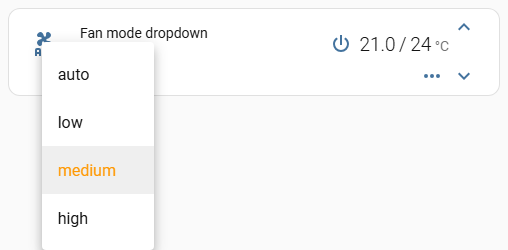
The dropdown under the name draws fan_mode's icon. A template can pick a
different glyph per mode; items is data the template reads back through
this as this.icon.items, because the context is the whole fan_mode
option, not the nested icon object. See this. Hide
the fan_mode button so the same control is not on the card twice.
A string on secondary_info.icon replaces this and freezes the glyph, which
is why that key is left off here.
type: custom:mini-climate
entity: climate.dahatsu
secondary_info: fan-mode-dropdown
fan_mode:
hide: true
icon:
items:
auto: 'mdi:fan-auto'
low: 'mdi:fan-speed-1'
medium: 'mdi:fan-speed-2'
high: 'mdi:fan-speed-3'
template: >
(state) => this.icon.items[state] || 'mdi:fan'
source:
auto: Automatic
low: Gentle
medium: Middling
high: Strong
hvac-mode-dropdown
The same line as fan-mode-dropdown, pointed at the HVAC mode instead of the
fan speed. The fan control stays where it was.
type: custom:mini-climate
entity: climate.dahatsu
secondary_info: hvac-mode-dropdown
hvac_mode:
  hide: true
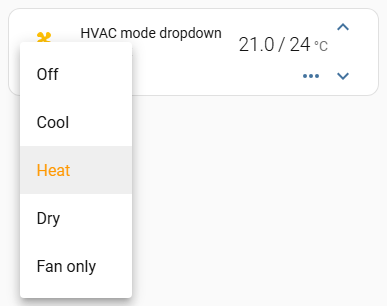
hvac_mode: hide is not optional decoration - without it the card shows the
mode twice, once in each place. The names come from Home Assistant's own
translations, the same list the control-row dropdown uses; a source on
hvac_mode replaces them, and it is read the same way in both places -
name, icon, order, and hide for a mode this card should not offer at
all:
type: custom:mini-climate
entity: climate.dahatsu
secondary_info: hvac-mode-dropdown
hvac_mode:
  hide: true
  source:
    'off': 'Off'
    cool: Cool
    heat: Heat
    dry:
      hide: true
A string on secondary_info.icon freezes the glyph; without it the line draws
the same per-mode icon as the control-row dropdown.