Mini Humidifier Card







A minimalistic yet customizable humidifier card for the Home Assistant Lovelace UI.
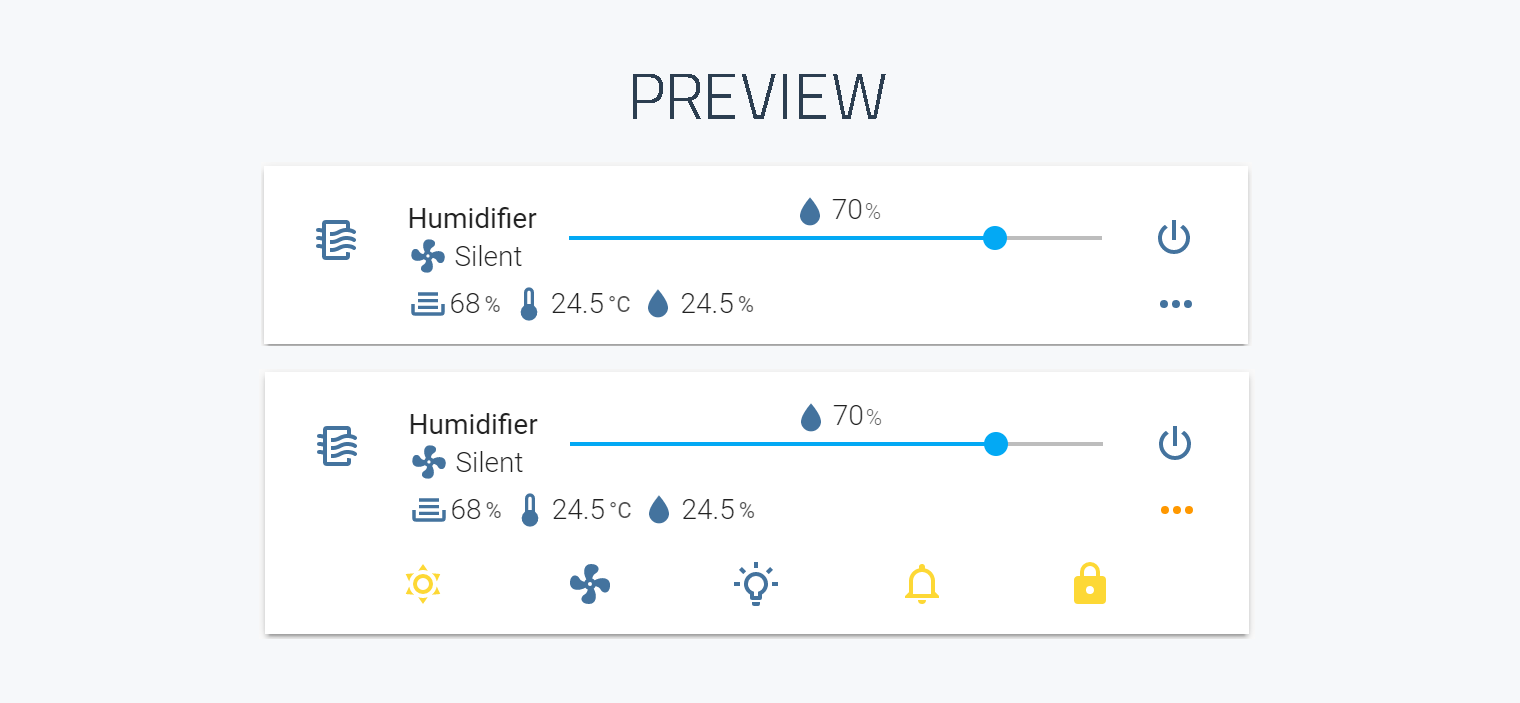
Please star this repository if you find it useful.
Compatibility
| Home Assistant | 2022.11 or newer |
| Entity domain | fan or humidifier |
The card is developed against the current Home Assistant release and tested on zhimi.humidifier.cb1. It renders Home Assistant's own frontend elements, and those change between releases: Home Assistant 2025.10 replaced the slider the card uses, which broke the layout of the target-humidity row. Version 3.1.6 and newer detect which slider they are running against and lay out correctly on either side of that line, so there is one build for every supported version.
Install
HACS
The card is in the HACS default repositories.
- Open HACS in Home Assistant.
- Search for mini humidifier and download it.
- HACS adds the dashboard resource for you. Reload the browser afterwards.
Manual
- Download
mini-humidifier-bundle.jsfrom the latest release and put it in yourconfig/wwwdirectory. - Register it as a dashboard resource.
On a dashboard in storage mode (the default), go to
Settings -> Dashboards -> three-dot menu -> Resources -> Add resource,
URL /local/mini-humidifier-bundle.js, type JavaScript Module.
On a dashboard in YAML mode, add it to your Lovelace configuration instead:
The ?v= part is only there to defeat the browser cache. Bump it whenever
you replace the file.
- Reload the browser.
Checking what you downloaded
mini-humidifier-bundle.js is built and signed by
the release workflow,
and every release body carries the file's sha256. With the
GitHub CLI you can check the copy on your disk
against the build that published it - through HACS or by hand, it is the same
file:
It prints the workflow and the tag the file was built from. Without the CLI, compare its sha256 with the one on the release page.
Updating
Through HACS, updates arrive like any other HACS update.
Manually: replace config/www/mini-humidifier-bundle.js with the file from the
latest release,
bump the ?v= query string if you use one, and reload the browser. Clearing the
browser cache is often necessary, because the frontend caches resources hard.
Skipping several versions at once is the usual case, since people update when they notice rather than when a release is tagged. Everything that changed in between is in CHANGELOG.md, newest first, rather than spread across one release page per version.
Quick start
That is the whole minimum configuration. Everything else has a default, taken from the model the card is configured for.

A slightly fuller example:
type: custom:mini-humidifier
entity: fan.xiaomi_miio_device
name: Bedroom
model: 'zhimi.humidifier.cb1'
secondary_info: last-changed
Documentation
Everything below is also published as a searchable site: artem-sedykh.github.io/mini-humidifier. It renders these same files, so there is nothing on it that is not here.
| Getting started | From the smallest card to one that is yours |
| Configuration | Every card option, the action object, theme variables |
| Models | Supported devices, and how to add one |
| Custom device | A device with no preset, end to end, and the contract the templates run under |
| Controls | Target humidity, power button, toggle button, secondary info, group |
| Indicators | The read-only values under the entity name |
| Buttons | The bottom panel: buttons and dropdowns |
| Examples | tap_action snippets |
| AI assistants | Writing a card with an assistant: the docs as llms.txt, and what to check in what comes back |
| Development | Building the card locally |
Contributing: CONTRIBUTING.md. Agents working on this repository should read AGENTS.md.
Supported models
model: selects a set of defaults. Two of them are not devices at all, and they
are the answer for hardware this card has no preset for:
humidifier- anyhumidifierentity: an MQTT humidifier, a dehumidifier on a smart switch, anything Home Assistant exposes in that domain.none- no bundled defaults, for a card that writes out every control itself.
The rest are devices: the model ids of your integration, which for the xiaomi_miio
ones have an xiaomi_miio_airpurifier: prefix when they come through syssi's
integration. A device that is not listed still works - start from
model: humidifier, or leave model: out to fall back to the
zhimi.humidifier.cb1 defaults. Every control can still be overridden in YAML.
The full table of device presets, and how to add one, is in Models.
Troubleshooting
An option seems to do nothing - open the browser console. The card reports
what it is about to ignore: a key it does not read, an action it does not
handle, a singular indicator: where it wants indicators:. It only warns and
carries on rendering, so nothing on the card itself will tell you.
"Custom element doesn't exist: mini-humidifier" - the resource is not
loaded. Check that the URL in the dashboard resources actually resolves in the
browser, and that its type is module.
The card looks wrong after an update - the browser is serving the old
bundle. Hard-reload, clear the cache, and bump the ?v= query string if you
installed manually.
A HACS update changed nothing, every time - check where your dashboard
resources live. When HACS manages them, which is the default, it rewrites the
resource URL on every update with a version-derived ?hacstag=, and the new
file is picked up by itself. If you keep resources: in YAML
(lovelace: resource_mode: yaml), HACS leaves them alone entirely - it logs
YAML mode detected, can not update resources and stops - so the URL never
changes and the browser keeps serving what it cached a month ago. In that
setup, bumping ?v= yourself after every HACS update is not optional.
An option does nothing - check the model: value. An unrecognised model is
not an error; the card silently falls back to the default one, and the defaults
it brings may not match your device.
Still stuck? Open an issue with your card YAML and the entity's attributes from Developer tools -> States.
Contributing: CONTRIBUTING.md - it has how to add a device, and the list of the people who built this card. Agents working on this repository should read AGENTS.md.
License
MIT. See LICENSE.