Models
The card ships defaults for a number of devices. model: picks which set of
defaults the card starts from; anything you set in YAML is merged over them.
Available default configurations
Each entry is the value to put in model:. The source file for every one of
them lives in
src/configurations.
Devices exposed by Home Assistant's own xiaomi_miio integration:
model: |
|
|---|---|
humidifier |
any humidifier entity, built on the domain rather than on a device - see below |
none |
no controls at all, for a card that describes its own - see below |
zhimi.humidifier.cb1 |
the default, used when model: is left out |
zhimi.humidifier.ca1 |
|
zhimi.humidifier.ca4 |
|
zhimi.airpurifier.ma2 |
|
zhimi.airfresh.va2 |
|
deerma.humidifier.jsq |
|
deerma.humidifier.jsq1 |
|
deerma.humidifier.mjjsq |
The same devices through syssi's third-party xiaomi_miio_airpurifier integration, which reports different attributes and calls different services:
model: |
|
|---|---|
xiaomi_miio_airpurifier:zhimi.humidifier.cb1 |
|
xiaomi_miio_airpurifier:zhimi.humidifier.ca4 |
by @ravikwow |
xiaomi_miio_airpurifier:zhimi.airpurifier.mb3 |
by @regevbr |
xiaomi_miio_airpurifier:zhimi.airfresh.va2 |
|
xiaomi_miio_airpurifier:deerma.humidifier.mjjsq |
|
xiaomi_miio_airpurifier:deerma.humidifier.jsq5 |
by @akovovh |
What each one draws
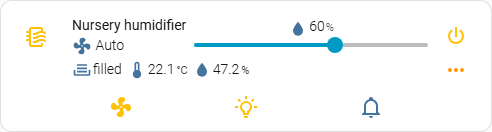
One picture per configuration, not per model: - three ids share the cb1
file and three more share deerma's, so six copies of one card would answer
nothing. Every card below is the same entity, a Xiaomi humidifier with the
sensors and switches its integration creates beside it, with the button panel
open.
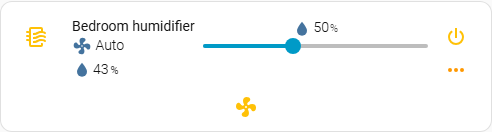
humidifier
The humidifier domain and nothing beyond it: on/off, the target slider from
min_humidity and max_humidity, the reading from current_humidity, and the
modes the entity reports.
none
Nothing at all - the name and the icon. Everything else is for the card to describe itself, which is what this preset is for.

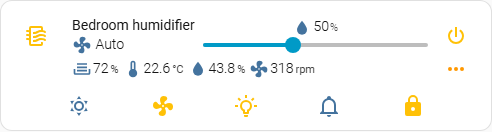
zhimi.humidifier.cb1, zhimi.humidifier.ca1, zhimi.humidifier.ca4
Water level, temperature, humidity and motor speed, read from the sensors the
integration creates beside the humidifier; dry mode, the fan modes, LED
brightness, buzzer and the child lock. This is the default, so it is also what a
card with no model: at all draws.
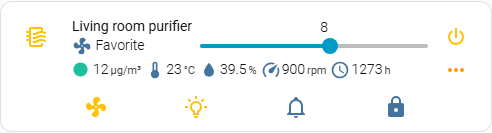
zhimi.airpurifier.ma2
An air purifier: the slider sets the favourite level rather than a humidity, and the first indicator is the air quality, coloured by how bad it is.
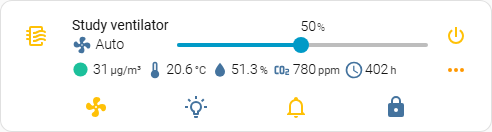
zhimi.airfresh.va2
The slider is the fan speed as a percentage, and there is a carbon dioxide reading and the filter's hours beside the air quality.
deerma.humidifier.jsq, deerma.humidifier.jsq1, deerma.humidifier.mjjsq
A simpler device: the water tank is a binary sensor rather than a level, so the
first indicator reads filled or empty, and there is no motor speed and no
child lock.
The same devices through syssi's component
These read everything as attributes of one fan entity and call that
component's own services, where the integration in the first table creates a
sensor, a switch and a select beside the humidifier. That is why the same device
appears twice: the card has to ask a different question.
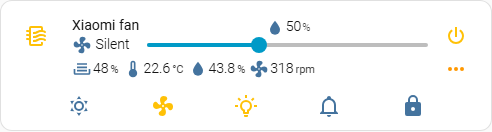
xiaomi_miio_airpurifier:zhimi.humidifier.cb1
Water depth, temperature, humidity and motor speed; dry mode, the fan modes, LED brightness, buzzer and the child lock.
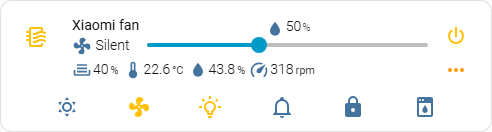
xiaomi_miio_airpurifier:zhimi.humidifier.ca4
The same, with the water level as a percentage rather than a depth, and a clean mode button of its own.
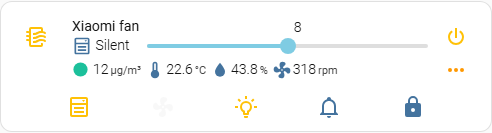
xiaomi_miio_airpurifier:zhimi.airpurifier.mb3
An air purifier: the slider sets the favourite level, and there is a fan level beside the modes.
xiaomi_miio_airpurifier:zhimi.airfresh.va2
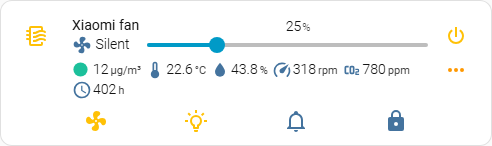
The slider is the fan speed, in the five steps the device has - the preset maps each to a preset mode rather than to a percentage, which is why it moves in quarters. Air quality, carbon dioxide and the filter's hours are read from the fan's own attributes.
xiaomi_miio_airpurifier:deerma.humidifier.mjjsq, xiaomi_miio_airpurifier:deerma.humidifier.jsq5
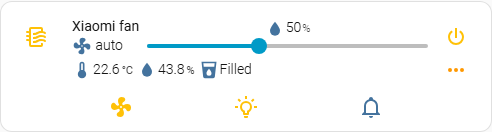
A simpler device again: temperature, humidity, and a water tank that reads
Filled or Empty rather than a level. The two differ in one thing the picture
cannot show - the slider's range, 30-80 for the mjjsq and 40-70 for the
jsq5.
A device that is not in the list
There are more humidifiers than this card ships configurations for, and that is the normal case rather than a gap to apologise for. Three ways to configure one.
model: humidifier - start from the domain
The preset for a plain Home Assistant humidifier: a
generic_hygrostat,
an MQTT humidifier,
a dehumidifier on a smart switch, anything else that is a humidifier entity
and nothing more.
That is the whole configuration. It is built on what Home Assistant guarantees for the domain and on nothing else:
| What | Where it comes from |
|---|---|
| power | humidifier.turn_on / humidifier.turn_off |
| target humidity | the humidity attribute, set with humidifier.set_humidity |
| the slider's range | the min_humidity and max_humidity attributes |
| the reading under the name | the current_humidity attribute |
| modes | available_modes, set with humidifier.set_mode, disabled when the device reports none |
Anything the device has beyond the domain - a night light, a buzzer, an external humidity sensor, a filter reading - is added in YAML on top, the same way it would be on any other model. What this preset deliberately does not do is guess: no LED, buzzer, child lock or water level, because those belong to particular integrations rather than to the domain, and a preset that assumes them calls services the device does not have.
Reach for it whenever the device is not in the table above and is a humidifier
entity. For a device exposed as fan, or one close to a bundled model, the two
options below still apply.
A card added from the dashboard picker for a humidifier entity starts here
already - the picker writes model: humidifier into the configuration it hands
you, so what it says is what the card is doing.
model: none - start from nothing
The preset that brings no controls at all. Nothing is merged in, so the card shows exactly what your YAML asks for and nothing else:
type: custom:mini-humidifier
entity: humidifier.my_device
model: none
name: Humidifier
power:
  hide: false          # single controls start hidden - see below
  type: button
  state:
    entity: switch.my_device
  toggle_action: |
    (state, entity) => {
      const service = state === 'on' ? 'turn_off' : 'turn_on';
      return this.call_service('switch', service, { entity_id: entity.entity_id });
    }
indicators:
  humidity:
    icon: mdi:water-percent
    unit: '%'
    source:
      entity: sensor.my_humidity
power and target_humidity start hidden, and want hide: false. Every
other section is a collection, so an empty one is simply empty; those two are
single controls, and an empty one would be a button that does nothing when
pressed. Writing the block is not enough on its own - say hide: false in it.
That is the one sharp edge of starting from nothing.
secondary_info shows the current mode by default, read off a mode button. A
card with none shows nothing there rather than failing.
Naming a device the card does not ship for
Writing a model: the card does not know is also supported, and does
something different: it starts from the default configuration and your YAML is
merged over it. Useful when your device is close to a bundled one and you want
to adjust rather than start over. Issue #112
is a complete example for a deerma.humidifier.jsq2w, which is not in the table
above.
What that gets you is a name for your device that stays in the configuration and
reads correctly to the next person to open it. What it does not get you is any
of that device's defaults, so plan on writing out the controls you want -
target_humidity, power, indicators, buttons - rather than expecting them
to arrive.
Since 3.4.0 the card says so in the browser console when it does this:
mini-humidifier: 'deerma.humidifier.jsq2w' is not one of the bundled model
configurations, so the card started from the default one. That is supported ...
The message is there for the other half of the same behaviour: a typo. Up to
3.3.0 zhimi.humidifier.cb11 and zhimi.humidifier.cb1 behaved identically and
nothing said which one the card had used, and deerma.humidifier.mjjsq against
xiaomi_miio_airpurifier:deerma.humidifier.mjjsq - one device through two
integrations that call different services - is the same trap with real
consequences. The card still renders either way; the console is where you find
out which set it started from.
Leaving model: out asks for the default set, as it always has. model: default
says the same thing explicitly and warns about nothing, and so does
model: none - it is a preset of the card's own, not an unrecognised id.
Which of the two to reach for: none when you are describing the device
yourself and the bundled controls are in the way, an unrecognised name when the
default set is most of what you want.
Adding a model
- Copy the closest existing file in
src/configurations/<integration>/and adjust it. zhimi_humidifier_cb1.js is the reference. - Register it in src/humidifiers.ts.
- Make sure
change_actionandtoggle_actioncall services that exist in the integration you filed the model under. A configuration copied from another integration renders correctly and does nothing when clicked. - Add the model to the tables above.
- Open a pull request. If you cannot write the file, open an issue with the entity's attributes from Developer tools -> States instead.
Using the default configuration for a specific model
type: custom:mini-humidifier
entity: fan.xiaomi_miio_device
# zhimi.humidifier.cb1 default value may be omitted, added for example.
model: 'zhimi.humidifier.cb1'
type: custom:mini-humidifier
entity: fan.xiaomi_miio_device
model: 'xiaomi_miio_airpurifier:deerma.humidifier.mjjsq'
localize status indicator